NEW: SG AI – YOUR AI ASSISTANT FOR TYPO3 – SEO, (IMAGE-) TEXT, IMAGES, AND MORE!
Table of Contents
- Ext: sg_apicore
- sg_apicore for TYPO3
- APIs & Registration
- Writing Endpoints
- TCA Mapper
- Auto-CRUD Resources
- OpenAPI Documentation
- Authentication & Scopes
- Logging
- Tenants
- Migration Guide: sg_rest to sg_apicore
Ext: sg_apicore
License: GNU GPL, Version 2
Repository: https://gitlab.sgalinski.de/typo3/sg_apicore
Please report bugs here: https://gitlab.sgalinski.de/typo3/sg_apicore/-/issues
Short Summary
Provides an API framework for TYPO3: Multi-API, Multi-Tenants, Attribute-based endpoint configuration, Logging, Token JWT Bearer auth, User auth, Entity CRUD registration, Custom Endpoints.
For detailed information, please refer to the Documentation in docs/. For website-ready end-user communication, see End-User-Documentation.
Directory Structure
The extension follows a standard TYPO3 extension structure with a focus on clean separation of concerns:
Classes/Attribute/: PHP attributes for routing, configuration, and security (e.g.,#[ApiRoute],#[RequireScopes]).Configuration/: Configuration readers and objects.Context/: Value objects for request context (e.g.,TenantContext).Controller/: API controllers handling the requests.Domain/:Repository/: Repositories for database access (e.g.,TokenRepository).
Middleware/: PSR-15 middlewares (e.g.,ApiRequestMiddlewarefor request interception).Security/: Authentication and authorization logic (e.g.,BearerTokenProvider,AuthContext).Service/Tenant/: Tenant resolution logic and resolvers.ApiRegistry.php: Service to register APIs and versions.Router.php: FastRoute-based dispatcher.
Configuration/: TYPO3 configuration files (Services, Middlewares, TCA).docs/: Technical documentation and guides.tests/: Unit and functional tests.
Installation
-
Install the extension via composer:
composer require sgalinski/sg-apicore -
Activate the extension in the TYPO3 Extension Manager.
Quick Start (3 Steps)
1. Register your Controller
Add your controller to Configuration/Services.php and tag it with sg_apicore.router:
$services->set(MyController::class)
->tag('sg_apicore.router');
2. Define an Endpoint
Use the #[ApiRoute] attribute in your controller action:
#[ApiRoute(path: '/hello', methods: ['GET'])]
public function helloAction(ServerRequestInterface $request): ResponseInterface {
return $this->responseService->createSuccessResponse(['message' => 'Hello!']);
}
3. Access the API
Open your browser at https://your-domain.local/api/docs/ui/ to see the generated Swagger UI and test your new
endpoint!
Testing
You can test the API by calling the health endpoint:
# Basic health check
curl https://your-project.local/api/health
# API-specific health check (if registered)
curl https://your-project.local/api/public/v1/health
The API path prefix is configurable via the extension configuration (default: /api/).
API Registration
To register a new API, you use the ApiRegistry service. Detailed configuration options can be found in
the APIs & Registration Documentation.
use SGalinski\SgApiCore\Service\ApiRegistry;
use TYPO3\CMS\Core\Utility\GeneralUtility;
$apiRegistry = GeneralUtility::makeInstance(ApiRegistry::class);
$apiRegistry->registerApi('public', ['1']);
Writing Endpoints
Endpoints are defined using PHP attributes on controller methods. See Writing Endpoints for a full guide. For a complete template with current best practices, see ExampleController.
#[ApiRoute(path: '/my-endpoint', methods: ['GET'], apiId: 'public', version: '1')]
public function myAction(ServerRequestInterface $request): ResponseInterface {
return $this->responseService->createSuccessResponse(['message' => 'Hello World']);
}
Standardized Responses
The ResponseService provides a unified way to create JSON responses, following RFC 7807 for errors.
See Writing Endpoints - Responses.
Pagination
The extension provides a PaginationService to handle consistent pagination across endpoints.
See Writing Endpoints - Pagination (Note: Add pagination details to docs if
missing).
TCA Mapper
The TcaMapper service allows you to map TYPO3 database records to API response arrays based on the TCA.
See TCA Mapper Documentation.
Auto-CRUD Resources
You can expose TYPO3 tables as API resources with full CRUD support. See Auto-CRUD Resources Documentation.
OpenAPI Documentation
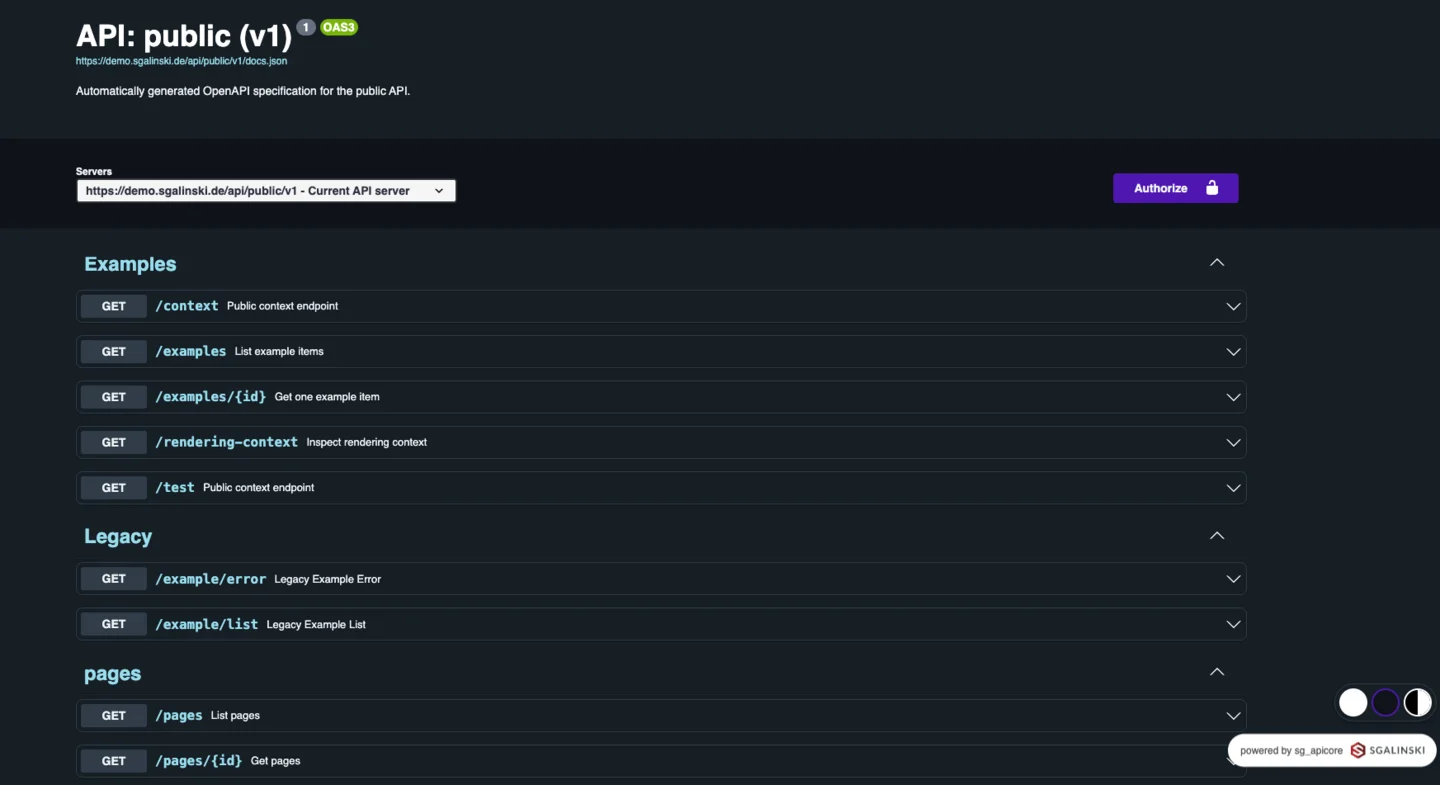
The extension automatically generates OpenAPI 3.0 specifications. You can access Swagger UI at
/api/{apiId}/v{version}/docs/ui. See OpenAPI Documentation.
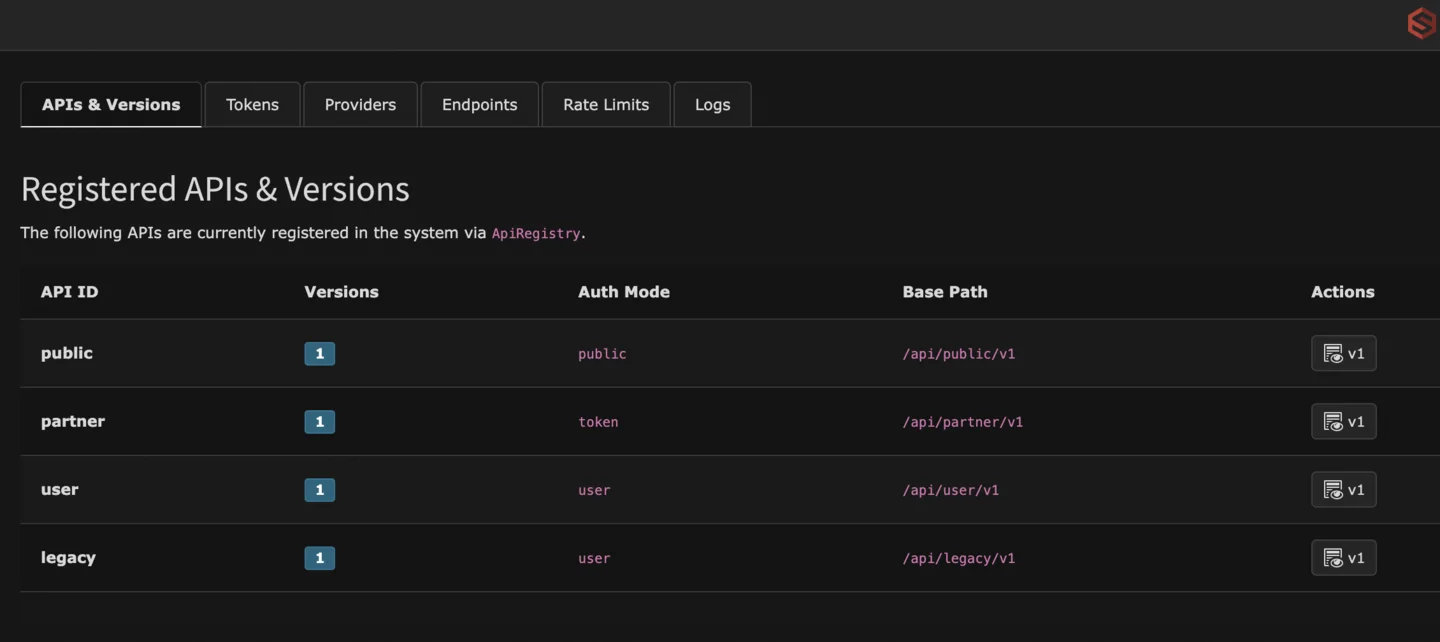
Backend Module
The extension provides a TYPO3 Backend Module under System > API Core.
- APIs & Versions: Overview and Swagger UI links.
- Token Management: Create and manage Opaque and Refresh tokens.
- Supports optional FE-user bound tokens (
user_idmapped tofe_users) for per-user API key flows. - Token list keeps current filter state while editing/revoking/regenerating.
- Supports optional FE-user bound tokens (
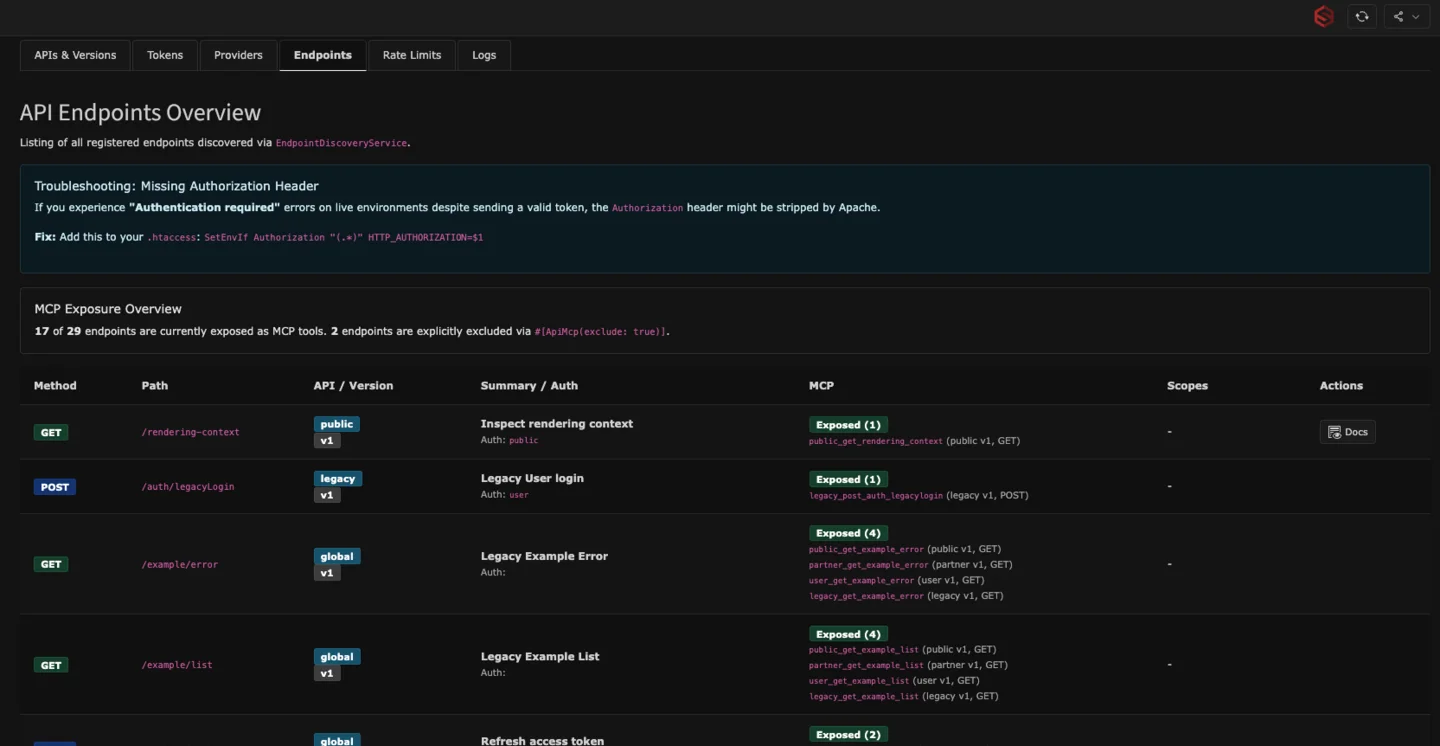
- Endpoints: List of all registered endpoints and their requirements.
See Authentication & Scopes - Backend for details.
Logging
Comprehensive logging for API requests and responses, including request tracking via a unique Request ID. See Logging Documentation.
Multi-Tenancy
Every API request runs in a TenantContext, usually derived from the TYPO3 Site. Endpoints can be filtered by
tenants using the tenants property in the #[ApiRoute] attribute.
See Tenants Documentation.
Security & Authentication
Supports multiple auth modes (public, token, user) and scope-based authorization.
- API Level: Define the default
authModeas a string in theApiRegistry. - Endpoint Level: Override or extend the
authModeusing the#[ApiRoute]attribute (supports string or array, e.g.,['public', 'user']).
CORS
CORS handling is provided by ApiCorsMiddleware and is enabled for API paths (apiPathPrefix) by default.
- Origin policy is default deny.
- Preflight requests (
OPTIONSwithAccess-Control-Request-Method) are answered directly. - Allowed origins are configured per API via
ApiRegistry::registerApi(..., $security):
$apiRegistry->registerApi('partner', ['1'], [
'authMode' => 'user',
'authProviders' => ['beareropaquetokenprovider'],
'cors' => [
'allowedOrigins' => ['https://app.example.org'],
'allowCredentials' => true,
],
]);
Known Issues & Troubleshooting
Missing Authorization Header (Apache)
In some hosting environments (especially Apache with PHP via CGI/FastCGI), the Authorization header is stripped before it reaches PHP. If you experience "Authentication required" errors despite sending a valid token, add the following to your .htaccess file:
SetEnvIf Authorization "(.*)" HTTP_AUTHORIZATION=$1
The extension includes a fallback to check for HTTP_AUTHORIZATION and REDIRECT_HTTP_AUTHORIZATION, but this server-side configuration is the most reliable fix.
Legacy Support (Migration from sg_rest)
The extension provides a bridge to support legacy sg_rest clients. This includes:
- Middleware for mapping old URL patterns.
- Support for
fe_usersauthentication tokens. - Emulation of the old response format.
Note: Legacy support is disabled by default. See the Migration Guide for details on how to enable and use it.
Architectural Decisions
For information on why we chose certain technologies and patterns, see our Architectural Decision Records at docs/adr/.
sg_apicore for TYPO3
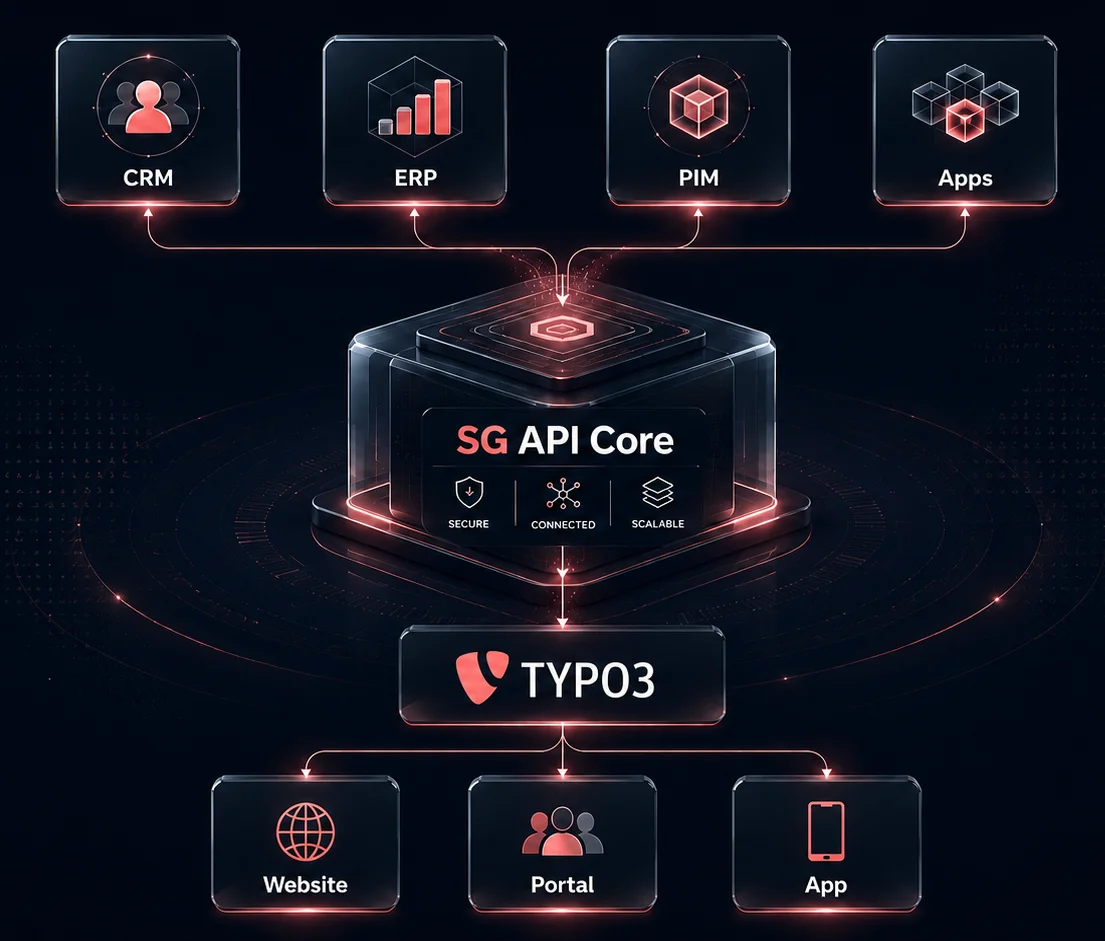
sg_apicore is a high-performance API framework for TYPO3 projects.
It enables teams to build secure, documented, and maintainable APIs directly in TYPO3 without adding a separate API platform.
This text is designed for website publication and product communication.
What sg_apicore Solves
Modern TYPO3 projects often need more than page rendering:
- headless frontends and apps
- partner portals and data integrations
- mobile apps and authenticated user APIs
- high-throughput machine-to-machine APIs
sg_apicore provides one consistent framework for these use cases, including routing, authentication, scopes, OpenAPI docs, caching, and observability.
Core Benefits
- Fast API routing based on PHP attributes
- Multiple APIs and versions in parallel
- Secure token and user authentication modes
- Fine-grained access control with scopes
- Automatic OpenAPI and Swagger UI generation
- Built-in response caching and cache invalidation
- Optional multi-tenant operation (site-based by default)
- TYPO3 backend module for API and token operations
- Legacy migration bridge for old
sg_restsetups
Typical Use Cases
- Public read-only content APIs
- Partner APIs with scope-based access
- User APIs with login, access token, and refresh token
- BFF endpoints for SPAs and native apps
- Controlled CRUD endpoints for TYPO3 tables
Authentication and Security
sg_apicore supports multiple authentication models:
public: no token requiredtoken: machine token (opaque bearer)user: user login with access and refresh tokenbackend: backend session based endpoints (internal use cases)
Security features include:
- Scope enforcement per endpoint
- Optional
RequireUserchecks for true user context - RFC 7807 compliant error responses
- Request IDs for tracing and support
- Configurable key redaction in logs
- Configurable rate limiting
API Documentation for Consumers
Every registered API can expose:
- JSON specification:
/api/{apiId}/v{version}/docs.json - Swagger UI:
/api/{apiId}/v{version}/docs/ui
This lets internal and external consumers test endpoints, inspect schemas, and integrate faster.
Operations and Performance
sg_apicore is built for production workloads:
- Response caching for GET requests
- Cache control and tag-based invalidation
- Optional language and user-group aware cache variation
- Rate-limit headers for client-side handling
- Dedicated backend dashboard for API visibility
Backend Module Highlights
In TYPO3 backend under System > API Core, teams can:
- inspect registered APIs and endpoints
- create and revoke API tokens
- manage token scopes and expiry
- inspect endpoint requirements
- monitor rate limits and logs
Multi-Tenant Readiness
Each request is processed in a tenant context.
By default, tenant resolution is site-aware and can be extended through resolver chains.
This allows one TYPO3 instance to provide separated API behavior for multiple sites or clients.
Why Teams Choose sg_apicore
- Uses TYPO3-native concepts instead of a disconnected external stack
- Clear and auditable endpoint definitions via attributes
- Good developer experience with generated API docs
- Reduced integration risks through standardized responses and validation
- Proven in active production projects with sustained load
Recommended Rollout Steps
- Define your API IDs and versions.
- Select auth modes per API (
public,token,user,backend). - Configure scopes and rate limits.
- Enable OpenAPI endpoints for internal and partner onboarding.
- Add caching rules for high-traffic read endpoints.
- Use backend token management for secure key lifecycle.
Further Technical Documentation
For implementation details, see:
docs/APIs.mddocs/WritingEndpoints.mddocs/AuthScopes.mddocs/OpenAPI.mddocs/RateLimiting.mddocs/Tenants.md
APIs & Registration
sg_apicore supports multiple APIs in parallel, each of which can have its own versions and security configurations.
API Registration
Registration takes place in your extension's ext_localconf.php via the ApiRegistry service.
use SGalinski\SgApiCore\Service\ApiRegistry;
use TYPO3\CMS\Core\Utility\GeneralUtility;
$apiRegistry = GeneralUtility::makeInstance(ApiRegistry::class);
// Registers a public API
$apiRegistry->registerApi('public', ['1'], [
'authMode' => 'public'
]);
// Registers a partner API with token authentication and rate limits
$apiRegistry->registerApi(
'partner',
['1', '2'],
[
'authMode' => 'token'
],
NULL,
[
'rateLimit' => [
'limit' => 120,
'windowSeconds' => 60,
'burst' => 30
]
]
);
Configuration Options
When registering, the following options can be passed in the third parameter:
authMode(string): Defines the default authentication mode for all endpoints of this API.public: No token required (unless explicitly required via attribute).token: A valid Opaque Bearer Token is required.user: A user login (Access/Refresh Token) is required.backend: A valid TYPO3 backend user session is required.
authProviders: List of allowed providers (e.g.,['beareropaquetokenprovider', 'backenduserprovider']).
Backend API Example
For internal APIs that should only be accessible to logged-in TYPO3 backend users, you can use the backend authMode:
$apiRegistry->registerApi('backend', ['1'], [
'authMode' => 'backend',
'authProviders' => ['backenduserprovider'],
]);
This configuration ensures that the API is only accessible if a valid backend user session exists. The
backenduserprovider automatically resolves the user and provides standard scopes like backend, partner:read,
partner:write, and user.
Use the fourth parameter to override the base path (default: /api/{apiId}/v{version}).
Endpoint Overrides
While the API-level authMode must be a string, individual endpoints can define multiple modes using an array in the
#[ApiRoute] attribute:
// Available via public access OR with a valid user token
#[ApiRoute(path: '/login', methods: ['POST'], authMode: ['public', 'user'])]
Use the fifth parameter for additional options:
rateLimit: Overrides rate limit settings for this API (seeRateLimiting.md).
Versioning
The version is specified in the URL with the prefix v, e.g., /api/public/v1/.... The ApiRegistry checks whether
the requested version is enabled for the respective API ID.
Writing Endpoints
In sg_apicore, endpoints are defined via standard PHP classes (controllers) configured using PHP attributes.
Recommended Template
Use docs/examples/ExampleController.php as the reference implementation. It covers:
- global and API-specific routes
- tenant and auth context usage
- query/path/body validation
RequireUserandRequireScopes- pagination with metadata
- response caching via
ApiCache - full TypoScript requirement via
RequireFullTypoScript
Controller Registration
For the router to recognize your controller class, it must be registered in Configuration/Services.php with the
sg_apicore.router tag:
$services->set(MyCustomController::class)
->tag('sg_apicore.router');
Routing & Metadata
Use the #[ApiRoute] attribute to define the path and methods. Additional attributes serve the automatic OpenAPI
documentation.
use SGalinski\SgApiCore\Attribute\ApiRoute;
use SGalinski\SgApiCore\Attribute\ApiEndpoint;
use SGalinski\SgApiCore\Attribute\ApiResponse;
use SGalinski\SgApiCore\Service\ResponseService;
use Psr\Http\Message\ResponseInterface;
use Psr\Http\Message\ServerRequestInterface;
class MyController {
public function __construct(
protected ResponseService $responseService
) {}
#[ApiRoute(path: '/my-action/{id}', methods: ['GET'], apiId: 'public', version: '1', tenants: 'my-tenant')]
#[ApiEndpoint(summary: 'Short description', tags: ['MyCategory'])]
#[ApiResponse(status: 200, description: 'Success')]
public function myAction(ServerRequestInterface $request, string $id): ResponseInterface {
$data = ['id' => $id, 'name' => 'Test'];
return $this->responseService->createSuccessResponse($data);
}
}
Endpoint Filtering
By default, an endpoint is available for all registered APIs and versions. You can restrict an endpoint to specific
APIs, versions, tenants, or auth modes by using the properties of the ApiRoute attribute:
// Only available for /api/public/v1/...
#[ApiRoute(path: '/public-only', methods: ['GET'], apiId: 'public', version: '1')]
// Only available for specific tenants (Site-ID by default)
#[ApiRoute(path: '/tenant-specific', methods: ['GET'], tenants: 'citypower-tenant')]
#[ApiRoute(path: '/multi-tenant', methods: ['GET'], tenants: ['tenant-a', 'tenant-b'])]
// Available for both public and partner APIs in version 1
#[ApiRoute(path: '/v1-shared', methods: ['GET'], apiId: ['public', 'partner'], version: '1')]
// Publicly accessible even in a protected 'user' or 'token' API
#[ApiRoute(path: '/auth/login', methods: ['POST'], authMode: 'public')]
Manual Property Mapping & Validation (Extbase Compatibility)
Since this extension avoids the Extbase bootstrap for performance reasons, automatic argument mapping is not available. You can still use Extbase's tools manually:
use TYPO3\CMS\Extbase\Property\PropertyMapper;
use TYPO3\CMS\Extbase\Validation\ValidatorResolver;
// Inside your controller action:
$myModel = $this->propertyMapper->convert($data, MyModel::class);
$results = $this->validatorResolver->getBaseValidatorConjunction(MyModel::class)->validate($myModel);
Request Context
During request handling, sg_apicore enriches the PSR-7 request with attributes. Most relevant ones:
api.tenant(TenantContext)api.auth(AuthContext, if authenticated)api.requestId(string)frontend.typoscript(when#[RequireFullTypoScript]is active)
Parameter Types & Validation
The extension supports automatic validation of parameters based on the attributes used in your controller.
- Path Parameters: Defined via
#[ApiPathParam]. Passed directly as arguments to the method (e.g.,$id). - Query Parameters: Defined via
#[ApiQueryParam]. Access via$request->getQueryParams(). - Body Parameters: Defined via
#[ApiBodyParam]. Access via$request->getParsedBody()(JSON bodies are automatically parsed by the middleware).
Validation Constraints
You can add various validation constraints to these attributes:
type: The expected data type (string,integer,float,boolean,array,file).required: Whether the parameter must be present.pattern: An optional regular expression (PCRE) the value must match.min/max: For numeric types, defines the inclusive range.minLength/maxLength: For string types, defines the length range.requiredIf: Makes a field required only if a certain condition is met.- Example:
requiredIf: 'type=special'(field is required if the fieldtypehas the valuespecial). - Example:
requiredIf: 'otherField'(field is required if the fieldotherFieldis present and not empty).
- Example:
Requirement of TypoScript
Some endpoints might require the full TYPO3 TypoScript configuration for parsing (e.g., using lib.parseFunc_RTE) or
rendering content. By default, the API context only provides a minimal TypoScript stub for performance reasons.
You can signal that an endpoint requires the full TypoScript to be loaded by using the #[RequireFullTypoScript]
attribute:
#[ApiRoute(path: '/render-content', methods: ['GET'])]
#[RequireFullTypoScript]
public function renderAction(ServerRequestInterface $request): ResponseInterface {
// The full TypoScript setup is now available via $request->getAttribute('frontend.typoscript').
}
Note: Loading the full TypoScript can significantly impact the performance of the API request as it triggers the TYPO3 TypoScript parsing and potentially caching mechanisms. Only use it if absolutely necessary.
Example:
#[ApiRoute(path: '/register', methods: ['POST'])]
#[ApiBodyParam(name: 'username', type: 'string', minLength: 5, maxLength: 20, pattern: '/^[a-z0-9_]+$/')]
#[ApiBodyParam(name: 'age', type: 'integer', min: 18)]
#[ApiBodyParam(name: 'type', type: 'string')]
#[ApiBodyParam(name: 'company_name', required: false, requiredIf: 'type=business')]
public function registerAction(ServerRequestInterface $request): ResponseInterface {
// ...
}
Automatic Validation from TCA
For Auto-CRUD resources, validation rules are automatically derived from the TYPO3 TCA:
eval => requiredresults inrequired: true.eval => emailresults in a standard email regex pattern.type => numberresults inintegerorfloattype validation.config => rangeresults inminandmaxvalidation.
Standardized Responses
Use the ResponseService for consistent JSON responses:
createSuccessResponse($data, $meta, $status): Generates a success response (optional with envelope).createErrorResponse($title, $detail, $status): Generates an RFC 7807 compliant error message.
Pagination
The extension provides a PaginationService to handle consistent pagination across endpoints.
Using the PaginationService
use SGalinski\SgApiCore\Service\PaginationService;
class MyController {
public function __construct(
protected PaginationService $paginationService,
protected ResponseService $responseService
) {}
#[ApiQueryParam(name: 'page', type: 'integer', description: 'The page number (1-based)')]
#[ApiQueryParam(name: 'limit', type: 'integer', description: 'Maximum number of items to return')]
public function listAction(ServerRequestInterface $request): ResponseInterface {
$pagination = $this->paginationService->getPaginationParams($request);
$offset = $pagination['offset'];
$limit = $pagination['limit'];
$items = $this->myRepository->findSubset($limit, $offset);
$total = $this->myRepository->countAll();
return $this->responseService->createSuccessResponse(
$items,
$this->paginationService->buildPaginationMeta($total, $offset, $limit)
);
}
}
The pagination metadata will be included in the meta object of the response (if the envelope is enabled or if meta is
explicitly passed).
Performance & Caching
The extension includes a built-in response caching system based on the TYPO3 Caching Framework.
Default Behavior
Caching is enabled by default for all GET requests. The cache key automatically varies by:
- The full Request URI
- The current Site and Language
- The Frontend User Groups (sorted to ensure consistency)
Controlling Cache
You can customize or disable caching using the #[ApiCache] attribute:
use SGalinski\SgApiCore\Attribute\ApiCache;
// Disable caching for this endpoint
#[ApiRoute(path: '/live-data', methods: ['GET'])]
#[ApiCache(enabled: false)]
public function liveAction(): ResponseInterface { ... }
// Customize caching
#[ApiRoute(path: '/heavy-list', methods: ['GET'])]
#[ApiCache(lifetime: 3600, tags: ['news', 'category_1'])]
public function listAction(ServerRequestInterface $request): ResponseInterface {
// This response will be cached for 1 hour with specific tags.
}
Cache Configuration
The #[ApiCache] attribute supports the following properties:
enabled(bool): Whether caching is enabled. Default istrue.lifetime(int): Cache lifetime in seconds. Default is0(system default).tags(array): A list of cache tags. Highly recommended for selective invalidation.useUserGroups(bool): Iftrue(default), the cache key varies by the user groups of the authenticated frontend user.useLanguage(bool): Iftrue(default), the cache varies by the current language.additionalVary(array): Additional query parameters or header names that should affect cache keys.
Cache Invalidation
The system automatically performs tag-based invalidation if a writing request (POST, PATCH, DELETE) is made to an
endpoint that defines the same cache tags.
For example, if a POST request is sent to an endpoint with #[ApiCache(tags: ['news'])], all cache entries with the
news tag will be flushed.
Note: For automatic resources (CRUD), caching and invalidation are handled automatically using the table name as a cache tag.
Clearing Cache manually
You can clear the entire API response cache in the TYPO3 Backend via the "Flush cache" menu (lightning icon) using the "Clear API Cache" entry. This entry is only available to backend administrators.
Cache Status Headers
You can monitor the cache status via the X-TYPO3-API-Cache HTTP header in the response:
HIT: The response was served directly from the cache.MISS: The response was newly generated and then stored in the cache.
TCA Mapper
The TcaMapper service allows TYPO3 database records (arrays) to be automatically converted into API-compliant
structures. It uses the information from the Table Configuration Array (TCA).
Features
- Automatic Whitelisting: Internal TYPO3 fields (such as
tstamp,crdate,hidden) are excluded by default. - Type Conversion:
- Booleans (for
type => check) - Integers (for
eval => intortype => number) - Date formats (ISO 8601 strings for
inputDateTime)
- Booleans (for
- Multi-Value Support: Comma-separated lists (e.g., relations) are automatically converted into arrays.
- Relation Resolution: Automatically resolves FAL (sys_file_reference), 1:n (IRRE) and M:M (MM table) relations.
- Custom Callbacks: Support for computed or dynamic fields during mapping.
- Field Renaming: Ability to expose database fields under different names in the API.
- Field Configurations: Granular control over allowed/excluded fields per table, including nested relations.
Usage in Controller
use SGalinski\SgApiCore\Mapper\TcaMapper;
class MyController {
public function __construct(
protected TcaMapper $tcaMapper,
protected ResponseService $responseService
) {}
public function getAction(ServerRequestInterface $request, string $id): ResponseInterface {
$record = $this->myRepository->findByUid($id);
// Mapping for tt_content
$mappedData = $this->tcaMapper->mapRecord('tt_content', $record);
return $this->responseService->createSuccessResponse($mappedData);
}
}
Restricting Fields
You can explicitly specify which fields should be mapped:
$allowedFields = ['uid', 'pid', 'header', 'bodytext'];
$mappedData = $this->tcaMapper->mapRecord('tt_content', $record, $allowedFields);
Mapping Multiple Records
Use mapRecords() for lists:
$records = $this->myRepository->findAll();
$mappedList = $this->tcaMapper->mapRecords('tx_myext_table', $records);
Advanced Features
Relation Resolution
The mapper can resolve relations automatically if a resolveDepth > 0 is provided:
$mappedData = $this->tcaMapper->mapRecord(
'tx_myext_table',
$record,
resolveDepth: 1
);
Supported relations:
- FAL:
sys_file_reference(images, documents) are always resolved to an array of file objects. - 1:n: IRRE relations using
foreign_fieldand optionalforeign_table_field. - M:M: Relations using an MM table.
- Select/Group: Fields with a
foreign_tableand comma-separated UIDs.
Field Configuration
You can pass a fieldConfiguration to control which fields are returned for specific tables, which is especially useful
for nested relations:
$fieldConfiguration = [
'tx_myext_table' => [
'allowed' => ['uid', 'title', 'related_item']
],
'tx_myext_related' => [
'excluded' => ['internal_field']
]
];
$mappedData = $this->tcaMapper->mapRecord(
'tx_myext_table',
$record,
fieldConfiguration: $fieldConfiguration,
resolveDepth: 1
);
Custom Callbacks
Use customCallbacks to handle computed fields or modify values dynamically:
$callbacks = [
'full_name' => function (array $record, array $mappedRecord) {
return $record['first_name'] . ' ' . $record['last_name'];
},
'dynamic_link' => function (array $record) {
return 'https://example.com/' . $record['slug'];
}
];
$mappedData = $this->tcaMapper->mapRecord(
'tx_myext_table',
$record,
customCallbacks: $callbacks
);
Field Renaming
Rename database fields for the API output:
$renamedFields = [
'tx_myext_legacy_field' => 'new_api_name'
];
$mappedData = $this->tcaMapper->mapRecord(
'tx_myext_table',
$record,
renamedFields: $renamedFields
);
Auto-CRUD Resources
sg_apicore allows you to expose TYPO3 database tables as API resources with full CRUD (Create, Read, Update, Delete)
support without writing any controller code.
Resource Registration
Resources are registered in your extension's ext_localconf.php via the ResourceRegistry service.
use SGalinski\SgApiCore\Service\ResourceRegistry;use TYPO3\CMS\Core\Utility\GeneralUtility;
$resourceRegistry = GeneralUtility::makeInstance(ResourceRegistry::class);
// Register tt_content as a resource for the 'public' API
$resourceRegistry->registerResource('public', 'tt_content', '/contents', [
'allowedOperations' => ['list', 'get'],
'readFields' => ['uid', 'pid', 'header', 'bodytext']
]);
// Register a custom table for the 'partner' API with full CRUD and scopes
$resourceRegistry->registerResource('partner', 'tx_myext_domain_model_item', '/items', [
'allowedOperations' => ['list', 'get', 'create', 'update', 'delete'],
'writeFields' => ['header', 'bodytext', 'pid'],
'deleteMode' => 'hard',
'tags' => ['Items'],
'requiredScopes' => [
'list' => ['partner:read'],
'get' => ['partner:read'],
'create' => ['partner:write'],
'update' => ['partner:write'],
'delete' => ['partner:write'],
]
]);
// Register pages as a resource for the 'public' API
$resourceRegistry->registerResource('public', 'pages', '/pages', [
'allowedOperations' => ['list', 'get'],
'readFields' => ['uid', 'pid', 'title', 'doktype', 'slug']
]);
Configuration Options
table: The TYPO3 table name.basePath: The base path for the resource endpoints (e.g.,/items).idField: The field used to identify a single item (default:uid).allowedOperations: Array of enabled operations (list,get,create,update,delete).readFields: Whitelist of fields for output mapping (empty = all except internal fields).writeFields: Whitelist of fields accepted forcreateandupdate.fieldConfiguration: Map of table names to their field configurations. Allows controllingallowedandexcludedfields for both the main record and related records (when resolved).- Example:
'fieldConfiguration' => [ 'tx_myext_domain_model_item' => [ 'allowed' => ['uid', 'header', 'related_item'], ], 'tx_myext_domain_model_related' => [ 'excluded' => ['internal_secret'], ] ]
- Example:
deleteMode:soft(default) uses DataHandler delete,harddeletes the DB record directly (no TYPO3 audit log).rateLimit: Optional rate limit overrides for this resource (seeRateLimiting.md).requiredScopes: Associative array mapping operations to required scope arrays.resolveDepth: Default recursion depth for resolving relations (default:1).
If writeFields is empty, the OpenAPI request body is generated from readFields. If both are empty, the request body
is generated from the table TCA (excluding uid).
Generated Endpoints
Based on the configuration, the following endpoints are automatically generated:
GET /api/{apiId}/v{version}/{basePath}: List resources (supports pagination, sorting, filtering).GET /api/{apiId}/v{version}/{basePath}/{id}: Get a single resource.POST /api/{apiId}/v{version}/{basePath}: Create a new resource.PATCH /api/{apiId}/v{version}/{basePath}/{id}: Update an existing resource.DELETE /api/{apiId}/v{version}/{basePath}/{id}: Delete a resource (returns 204 without a response body).
List Operation Features
Pagination
Use page and limit query parameters:
GET /api/public/v1/contents?page=2&limit=20
Note: perPage is also supported as an alias for limit for backward compatibility.
Sorting
Use the sort query parameter. Prefix with - for descending order:
GET /api/public/v1/contents?sort=header (ASC)
GET /api/public/v1/contents?sort=-uid (DESC)
Filtering
Use the filter query parameter with field names:
GET /api/public/v1/contents?filter[header]=Welcome
You can also use arrays for IN-queries:
GET /api/public/v1/contents?filter[uid][]=1&filter[uid][]=2
Only fields defined in readFields (or whitelisted in fieldConfiguration or all if empty) can be used for filtering.
Persistence & DataHandler
For create, update, and delete operations, the extension uses the TYPO3 DataHandler. This ensures that:
- All TYPO3 hooks are executed.
- Reference indexing is updated.
- History and logging are maintained.
- Permissions are respected (if a backend user context exists).
Data provided in the request body is automatically mapped using the TcaMapper, handling types like booleans and dates
correctly.
Backend User for Resource Writes
Auto-CRUD write operations (create, update, delete) can run under a dedicated backend user. Configure the backend
user UID via the extension configuration key apiResourceWriteBackendUserId.
If set, the configured backend user's permissions and groups are used for resource write operations. If not set (or 0), the extension keeps the admin bypass behavior for write operations.
This setting only affects Auto-CRUD resource endpoints and does not apply to custom controllers.
OpenAPI Documentation
sg_apicore automatically generates OpenAPI 3.0 specifications based on the attributes in your controllers.
Browser Access
Every registered API provides endpoints for documentation:
- JSON Specification:
/api/{apiId}/v{version}/docs.json - Swagger UI:
/api/{apiId}/v{version}/docs/ui
Example: https://your-website.com/api/public/v1/docs/ui
Metadata Attributes
To make the specification meaningful, use the following attributes on your controller methods:
#[ApiEndpoint]: Summary, description, and tags.#[ApiQueryParam]: Describes a query parameter.#[ApiBodyParam]: Describes fields in the JSON body.#[ApiPathParam]: Describes a parameter in the URL path.#[ApiResponse]: Describes possible responses (status code, description, schema).
Global Schemata
You can define global schemas that can be reused across multiple endpoints. This is useful for complex objects like " Offer" or "User".
use SGalinski\SgApiCore\Service\SchemaRegistry;
use TYPO3\CMS\Core\Utility\GeneralUtility;
$schemaRegistry = GeneralUtility::makeInstance(SchemaRegistry::class);
$schemaRegistry->registerSchema('public', 'MyObject', [
'type' => 'object',
'properties' => [
'id' => ['type' => 'integer'],
'name' => ['type' => 'string']
]
], 'tx_my_table'); // Optional: Map to TCA table for enrichment
Referencing a schema in an attribute:
#[ApiResponse(status: 200, schema: 'MyObject')]
#[ApiResponse(status: 200, schema: 'MyObject[]')] // Array of objects
TCA Enrichment
sg_apicore automatically enriches schemas with labels from the TYPO3 TCA.
-
Global Schemas: If a
$tableNameis provided duringregisterSchema(), all properties in the schema that match TCA columns will automatically receive the translatedlabelas their OpenAPIdescription. This works recursively for nested objects withforeign_tablerelations. -
Ad-hoc Schemas: If you provide a
schemaname (table name) in the#[ApiResponse]attribute without a global definition, it will also be enriched. -
Merging with Examples: When combining a
schema(reference or table) with anexample, the generator merges the structures. Properties from the schema are preserved, and example values are used to infer types or provide sample data. -
Remapped Fields: If a property in your schema does not match the TCA column name (e.g., it was remapped in your API), you can add a custom
x-tca-fieldproperty to the schema property definition to specify the original TCA column name.Example:
$schemaRegistry->registerSchema('partner', 'Offer', [ 'type' => 'object', 'properties' => [ 'tags' => [ 'type' => 'array', 'x-tca-field' => 'offertags', // Original TCA column name 'items' => [...] ] ] ], 'tx_citypower_domain_model_offer');
Automatic Schema Generation
sg_apicore can automatically generate schemas from your example data. If you provide an example in the
#[ApiResponse] attribute, the service will recursively build an OpenAPI schema based on its structure and data types.
If you also provide a schema name (usually a table name or a DTO class name) in the #[ApiResponse] attribute, the
generator will attempt to enrich the schema with descriptions from the corresponding TCA labels.
Example:
#[ApiResponse(status: 200, description: 'Success response', schema: 'tx_my_table', example: [
'title' => 'Sample Title',
'child' => [
'name' => 'Sub-item'
]
])]
In this case, the generator will check tx_my_table for the title label and use it as a description. For the nested
child object, it will look at the foreign_table configuration in the TCA of tx_my_table to resolve labels for the
child's properties.
Schema Placeholders in Examples
If you provide an example in the #[ApiResponse] attribute, you can use placeholders to reference global schemas
within your example structure. This is extremely useful for paginated responses where you want to show the full
structure
of the items without repeating the schema definition.
The format is schema:SchemaName or schema:SchemaName[] (for an array).
Example:
#[ApiResponse(status: 200, description: 'List of offers', schema: 'Offer[]', example: [
'data' => 'schema:Offer[]',
'meta' => [
'total' => 100,
'page' => 1
]
])]
The generator will automatically replace the placeholder with a generated stub based on the "Offer" schema's properties and their example values or types.
CLI Export
You can also export the specification to a file via the command line:
vendor/bin/typo3 api:openapi:generate --api=public --api-version=1 --out=openapi.json
Security Schemes
The generated specification automatically includes a bearerAuth scheme. If an API does not run in public mode, this
scheme is marked as required globally for all endpoints.
Authentication & Scopes
sg_apicore provides a flexible system for authentication and authorization.
Authentication Modes
The default mode is defined per API in the ApiRegistry as a string (see APIs.md). Individual endpoints
can override or extend this using the #[ApiRoute] attribute (supporting both string and array).
- Public: No authentication required.
- Token (Opaque Bearer): Requires an API key in the header:
Authorization: Bearer <token>. - User: Requires a user login. Supports access and refresh tokens.
Example for an endpoint that is both public and user-accessible:
#[ApiRoute(path: '/auth/login', methods: ['POST'], authMode: ['public', 'user'])]
Scopes (Permissions)
Scopes are used to control access to specific endpoints in a fine-grained manner. A token can have a list of scopes.
Enforcing Scopes
Use the #[RequireScopes] attribute on your controller method:
use SGalinski\SgApiCore\Attribute\RequireScopes;
#[RequireScopes(['partner:read', 'partner:write'])]
public function updateAction(...) {
// This method will only be executed if the token possesses BOTH scopes.
}
User Authentication
If the user mode is active, a TYPO3 frontend user can authenticate via the login endpoint:
- URL:
POST /api/{apiId}/v1/auth/login - Body:
{"username": "...", "password": "..."} - Response: Contains
access_token,refresh_token,token_type,expires_in.
User Storage and Site Awareness
By default, users are searched for in the current TYPO3 Site Root. You can customize the storage pages (PIDs) in several ways:
- sg_account Integration: If
sg_accountis installed, it uses the storage defined in the Main Configuration. - Site Configuration: Define storage PIDs in your
site.yaml:apicore: userStoragePids: "123,456" - Fallback: Falls back to the root page ID of the current site.
RequireUser Attribute
To ensure that a request comes from a real user (and not just an M2M token), use:
use SGalinski\SgApiCore\Attribute\RequireUser;
#[RequireUser]
public function profileAction(...) {
// Only accessible to logged-in frontend users.
}
Events
The extension provides PSR-14 events to hook into various processes.
AfterUserAuthenticationEvent
This event is triggered after a user has successfully authenticated (e.g., password check passed), but before tokens are generated and the response is sent. It allows you to perform additional checks (like account expiration) and block the login.
- Payload:
getUser()(array),getTenantContext()(?TenantContext). - Blocking Login: Throw an
SGalinski\SgApiCore\Exception\AuthenticationExceptionwithin your listener to abort the login process with a custom message.
Example Listener:
public function __invoke(AfterUserAuthenticationEvent $event): void {
$user = $event->getUser();
if ($user['is_blocked']) {
throw new AuthenticationException('Your account is blocked.');
}
}
Authentication Error Responses
Authentication failures return RFC 7807 Problem JSON, include requestId for tracing, and set X-Request-ID.
If rate limiting is applied, use X-RateLimit-Limit, X-RateLimit-Remaining, and X-RateLimit-Reset headers and
optionally provide a rateLimit object in the response body.
- 401 Unauthorized: Missing credentials (
Authentication required.). - 401 Unauthorized: Invalid or expired token (
Invalid or expired token.). - 403 Forbidden: Authenticated but missing required scopes or
#[RequireUser].
Rate Limit Configuration
Use the extension configuration to enable and tune rate limits:
rateLimitEnabled(boolean)rateLimitDefaultLimit(int, requests per window)rateLimitWindowSeconds(int, window size)
See also: docs/RateLimiting.md.
Authentication Error Responses
Authentication failures return RFC 7807 Problem JSON, include requestId for tracing, and set X-Request-ID.
If rate limiting is applied, use X-RateLimit-Limit, X-RateLimit-Remaining, and X-RateLimit-Reset headers and
optionally provide a rateLimit object in the response body.
- 401 Unauthorized: Missing credentials (
Authentication required.). - 401 Unauthorized: Invalid or expired token (
Invalid or expired token.). - 403 Forbidden: Authenticated but missing required scopes or
#[RequireUser].
Token Management in the Backend
In the TYPO3 backend under System > API Core, you can:
- Create new Opaque tokens (M2M).
- Optionally bind tokens to a specific FE user (
fe_users.uidviauser_id). - View and revoke existing tokens.
- Manage scopes and expiration dates.
- Keep and reuse the current token filters while performing token actions.
Logging
sg_apicore offers a comprehensive logging system for API requests and responses. It is designed to ensure traceability
without compromising sensitive data.
Global Configuration
Logging can be controlled in the extension configuration (settings.php or Extension Manager):
enableLogging: Global switch for API logging.logHeaders: Whether HTTP headers should be logged.logBody: Whether the request body should be logged.logResponse: Whether the response body should be logged.redactKeys: Comma-separated list of keys whose values are masked in the logs (e.g.,password,token,access_token).
Per-Endpoint Configuration
With the #[ApiLogging] attribute, the global settings can be overridden for individual methods:
use SGalinski\SgApiCore\Attribute\ApiLogging;
#[ApiLogging(
enableLogging: true,
logHeaders: true,
logBody: true,
logResponse: true
)]
public function sensitiveAction(...) { ... }
Request Tracking
Every API request receives a unique Request ID (Correlation ID). This ID:
- Is attached to the request as the
api.requestIdattribute. - Is included in every log message.
- Is returned as an
X-Request-IDHTTP header in the response.
This allows an API call to be tracked from the client deep into the server logs.
Customizing the Log Destination
By default, logs are written to the file var/log/sg_apicore.log. This can be adjusted via the TYPO3 log configuration:
$GLOBALS['TYPO3_CONF_VARS']['LOG']['SGalinski']['SgApiCore']['Service']['LogService']['writerConfiguration'] = [
\Psr\Log\LogLevel::INFO => [
\TYPO3\CMS\Core\Log\Writer\FileWriter::class => [
'logFile' => \TYPO3\CMS\Core\Core\Environment::getVarPath() . '/log/custom_api.log'
]
]
];
Tenants
In sg_apicore, every request is executed within a TenantContext. This enables the operation of multiple tenants (
e.g., different websites or departments) within a single TYPO3 instance.
Tenant Resolution
By default, the tenant is automatically derived from the TYPO3 Site. The TenantResolverChain successively checks
various strategies:
- SiteTenantResolver: Uses the TYPO3 site configuration.
- HeaderTenantResolver: Checks for the
X-Tenant-IdHTTP header.
Configuration
The strategy of the SiteTenantResolver can be adjusted in the extension configuration (settings.php or Extension
Manager):
siteTenantIdSource:identifier(default): Uses the site identifier from TYPO3 (e.g.,main_site).baseHost: Uses the site's hostname (e.g.,www.example.com).rootPageId: Uses the UID of the root page.
onMissingTenant: HTTP status code when no tenant is found (default:404).
Usage in Code
The TenantContext is available in the request object as an attribute:
use SGalinski\SgApiCore\Context\TenantContext;
public function myAction(ServerRequestInterface $request): ResponseInterface {
/** @var TenantContext $tenantContext */
$tenantContext = $request->getAttribute('api.tenant');
$tenantId = $tenantContext->getTenantId();
// Access the TYPO3 site object (if available)
$site = $tenantContext->getSite();
// ...
}
Endpoint Filtering by Tenant
You can restrict specific endpoints to certain tenants using the tenants property of the #[ApiRoute] attribute.
This is useful for extending an existing API for a specific tenant without affecting others.
use SGalinski\SgApiCore\Attribute\ApiRoute;
// Only available for the tenant 'citypower-tenant'
#[ApiRoute(path: '/custom-data', methods: ['GET'], tenants: 'citypower-tenant')]
public function customDataAction(): ResponseInterface {
// ...
}
// Available for multiple specific tenants
#[ApiRoute(path: '/shared-data', methods: ['GET'], tenants: ['tenant-a', 'tenant-b'])]
public function sharedAction(): ResponseInterface {
// ...
}
Multi-Language Handling
The TenantContext also captures the current language. By default, sg_apicore is fully language-aware:
- Language Resolution: The language is automatically detected via the TYPO3 Site configuration (e.g., via URL
prefixes like
/en/api/...). - Context Initialization: The extension automatically initializes the TYPO3
LanguageAspectin the globalContext. This ensures that Repositories and theTcaMapperautomatically return translated content. - Usage:
$languageId = $tenantContext->getLanguageId();
Custom Resolvers
You can implement your own resolvers by implementing the TenantResolverInterface and registering the service with the
sg_apicore.tenant_resolver tag.
Migration Guide: sg_rest to sg_apicore
This document describes how to migrate existing APIs from the deprecated sg_rest extension to the new sg_apicore
architecture.
0. Preparation
To enable the backward compatibility features, you must first activate the legacy support in the extension configuration
of sg_apicore:
- Go to Admin Tools > Extension Configuration.
- Select
sg_apicore. - Enable the checkbox Activate Legacy Support.
- Clear all caches.
1. Concept Comparison
| Feature | sg_rest | sg_apicore |
|---|---|---|
| Routing | Automatic via apiKey and entity |
Declarative via #[ApiRoute] attributes |
| Auth | fe_users (tx_sgrest_auth_token) |
Opaque Tokens, JWT, Legacy Bridge |
| Models | Extbase Models | Plain PHP/DTOs or directly via TCA mapping |
| Response | Fixed JSON format | Flexible, Default: RFC 7807 (Errors) |
2. Backward Compatibility (Legacy Mode)
sg_apicore provides a bridge to continue serving old clients with minimal changes.
URLs & Routing
The LegacyRoutingMiddleware automatically handles old sg_rest style requests. It supports two formats:
- Query-based:
/?type=1595576052&tx_sgrest[request]=apiKey/entity/identifier - Path-based:
/apiKey/entity/identifier(Requirestype=1595576052parameter for precision)
These requests are internally mapped to the new structure:
/api/legacy/v1/{apiKey}/{entity}/{identifier}
Important: You must register a
legacyAPI in yourext_localconf.phpto handle these requests. By default, thesg_apicoredemo configuration already includes this.
Token Authentication (Bearer Token)
The old sg_rest authentication via authentication/authentication/getBearerToken is supported through a special
mapping to /api/legacy/v1/auth/login.
Response Format: It returns the expected {"bearerToken": "..."} format.
Manual Endpoint Mapping
Since sg_apicore uses declarative routing, you must manually map your old endpoints in your controllers.
- Register the
legacyAPI. - Create or update your controllers.
- Add
#[ApiRoute]with the path matching your old structure including theapiKey.
Example:
Old endpoint: apiKey/news/list
New mapping:
#[ApiRoute(path: '/apiKey/news/list', methods: ['GET'])]
public function listAction(...)
User Token Migration
The old tx_sgrest_auth_token in fe_users is deprecated and no longer supported.
All clients MUST migrate to the new token system.
If you want to log in against a user account, you can use the following steps:
- Users should authenticate via the new
/api/legacy/v1/auth/legacyLogin(or/api/legacy/v1/auth/login) endpoint. - This will issue a new token (Opaque or JWT) stored in the
tx_apicore_tokentable. - Once all clients are migrated, the
tx_sgrest_auth_tokencolumn can be removed from thefe_userstable.
Response Format
Use the #[ApiLegacyMode] attribute on your controller or action to emulate the old JSON format
(data wrapping, legacy error format). If your endpoint requires full TypoScript for rendering,
use the #[RequireFullTypoScript] attribute as well:
#[ApiLegacyMode(source: 'sg_rest', wrapData: true, legacyErrorFormat: true)]
#[RequireFullTypoScript]
class MyLegacyController {
// ...
}
3. Step-by-Step Migration
- API Registration: Register a new API in
ext_localconf.phpusing the name of your old API key. - Create Controller: Create a new controller and use
#[ApiRoute]to map the old paths. - Data Access:
- For simple CRUD operations, use TCA Mapping (Phase K).
- For complex logic, inject your repositories or services into the controller.
- Auth: The
LegacyTokenProviderwas removed. You must issue new tokens via the login endpoints.
4. Example: News API Migration (EXT:sg_demo)
In the sg_demo extension, a legacy news API was migrated.
Old Controller (sg_rest):
- Path:
news/news/list - Authenticated via
api.authrequest attribute (replacesAuthenticationServiceInterface).
Migrated Controller (sg_apicore):
namespace SGalinski\SgDemo\Controller\Rest\News;
use SGalinski\SgApiCore\Attribute\ApiRoute;
use SGalinski\SgApiCore\Attribute\ApiLegacyMode;
use SGalinski\SgApiCore\Attribute\RequireUser;
class NewsController {
#[ApiRoute(path: '/news/news/list', methods: ['GET'], apiId: 'legacy')]
#[ApiLegacyMode]
#[RequireUser]
public function getListAction($request) {
// ... (use NewsRepository to fetch data)
return $this->responseService->createSuccessResponse($response);
}
}
The LegacyRoutingMiddleware handles the incoming request:
- Client calls
/?type=1595576052&tx_sgrest[request]=news/news/list. - Middleware maps this to
/api/legacy/v1/news/news/list. - Router matches the route
/news/news/listfor thelegacyAPI. #[ApiLegacyMode]ensures the response format matches what the client expects.#[RequireUser]ensures the client must provide a valid (legacy) token.