

NEW: SG AI – Your AI Assistant for TYPO3 – SEO, (image-)text, images & more!
0 Comments // Reading Time: 25 min.
TYPO3 v14 LTS is the latest Long-Term Support version of the enterprise content management system. This release is not centered on one spectacular feature. Instead, it delivers a noticeably better day-to-day experience: the backend has been modernized, content and page properties can be edited directly in context, new pages are created step by step, and multilingual content is easier to manage.
TYPO3 v14 also establishes the technical foundation for the coming years. It supports current PHP versions, introduces Fluid 5, and receives free security updates through the end of June 2029. This gives companies a modern, predictable long-term platform for websites, portals, and digital applications.
In this article, we present the most important new features, explain their benefits for content teams, marketing, and development, and show when an upgrade to TYPO3 v14 makes sense.
TYPO3 Lifecycle: LTS, Support, and ELTS
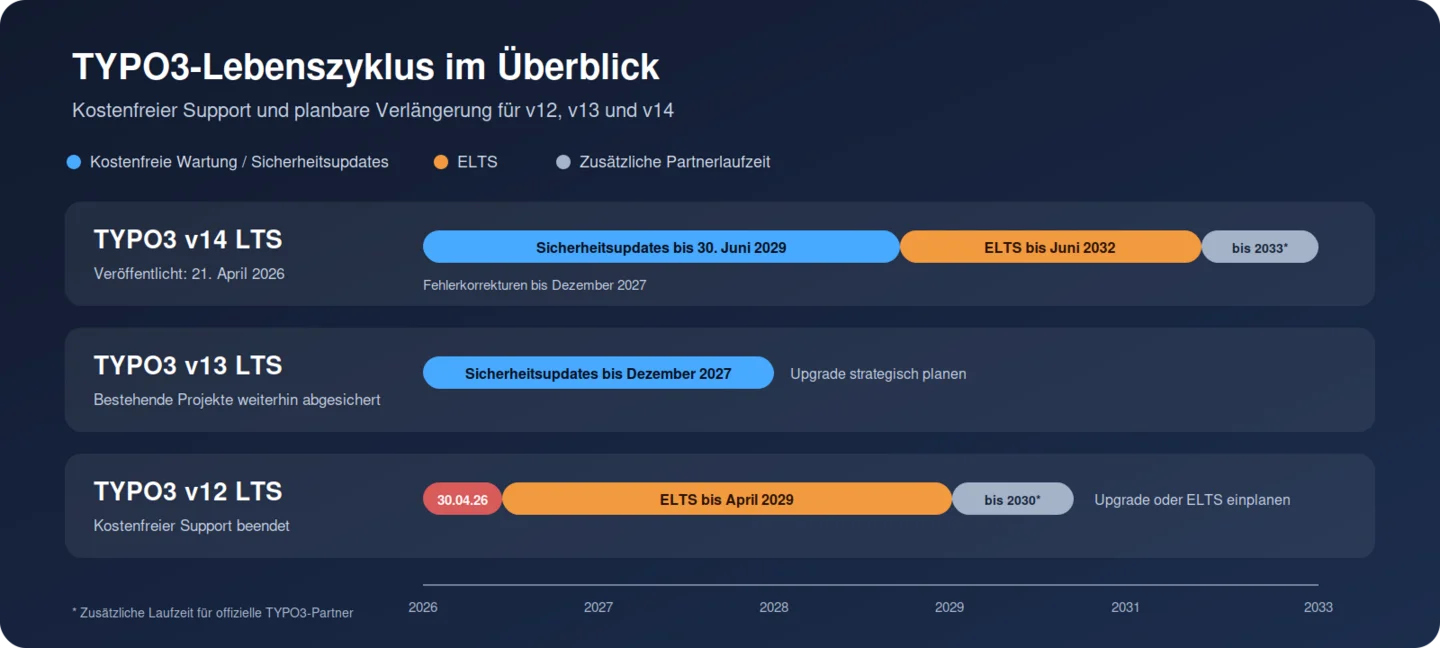
TYPO3 releases a new LTS version approximately every 18 months. A Long-Term Support release initially receives regular maintenance and bug fixes, followed by free security updates over a longer period. If required, operation can subsequently be extended through the paid Extended Long Term Support program, or ELTS.
TYPO3 v14.3 LTS was released on April 21, 2026. Free bug fixes are scheduled through December 2027, and free security updates through June 30, 2029. ELTS can then extend the lifecycle through June 2032; official TYPO3 partners can receive an additional year through June 2033.
For versions currently in use, this means:
- TYPO3 v14 LTS is the recommended version for new projects. It receives free security updates through June 2029.
- TYPO3 v13 LTS remains a stable and supported version for existing projects. Free security updates are scheduled through the end of December 2027.
- TYPO3 v12 LTS reached the end of free support on April 30, 2026. Without an upgrade, the installation will receive further security and compatibility updates only through a paid ELTS agreement.
A TYPO3 v12 website will continue to function after support ends. However, because newly discovered security vulnerabilities are no longer resolved through free updates, it should not remain in operation without a concrete upgrade or ELTS plan. There is less immediate time pressure for TYPO3 v13. Nevertheless, an early, planned upgrade can be worthwhile when the new editing features are needed, technical dependencies are being modernized, or major changes are already planned.
Installations running TYPO3 v11, v10, or older versions can also be migrated to v14. However, the process requires several controlled major-version steps and a more detailed review of extensions, custom code, templates, integrations, and data structures. Available ELTS periods vary by source version and can provide only temporary protection.
Why TYPO3 v14 Stands Out
The new LTS release improves content workflows, marketing tools, and the technical foundation — with long-term support through 2029.
A Modernized Backend with Clearer Navigation
The redesigned TYPO3 backend is apparent from the first login. A fresh visual design, a restructured top bar, modernized icons, and a more consistent layout provide a clearer overview. These changes are more than cosmetic: modules have clearer names and are grouped more logically, helping less experienced backend users find their way around more quickly.
Light or Dark Backend—Whatever Suits Your Workflow
The backend can use a light or dark color scheme, or automatically follow the operating system setting. Fresh, Modern, and Classic backend themes are also available. The selection is saved for each user account, allowing every team member to work with their preferred presentation.
In TYPO3 v14, the CKEditor interface also follows the light or dark color scheme by default. This makes formatted-text editing more consistent with the rest of the backend interface.
Interactive breadcrumbs show the current location within a module and provide direct access to parent areas. This is particularly useful for large websites, deep page trees, and extensive data structures. Recurring tasks become easier to find, and onboarding new editors becomes simpler.
Important for existing websites: the modernization affects the TYPO3 backend. An upgrade does not automatically change the design or presentation of the public website.
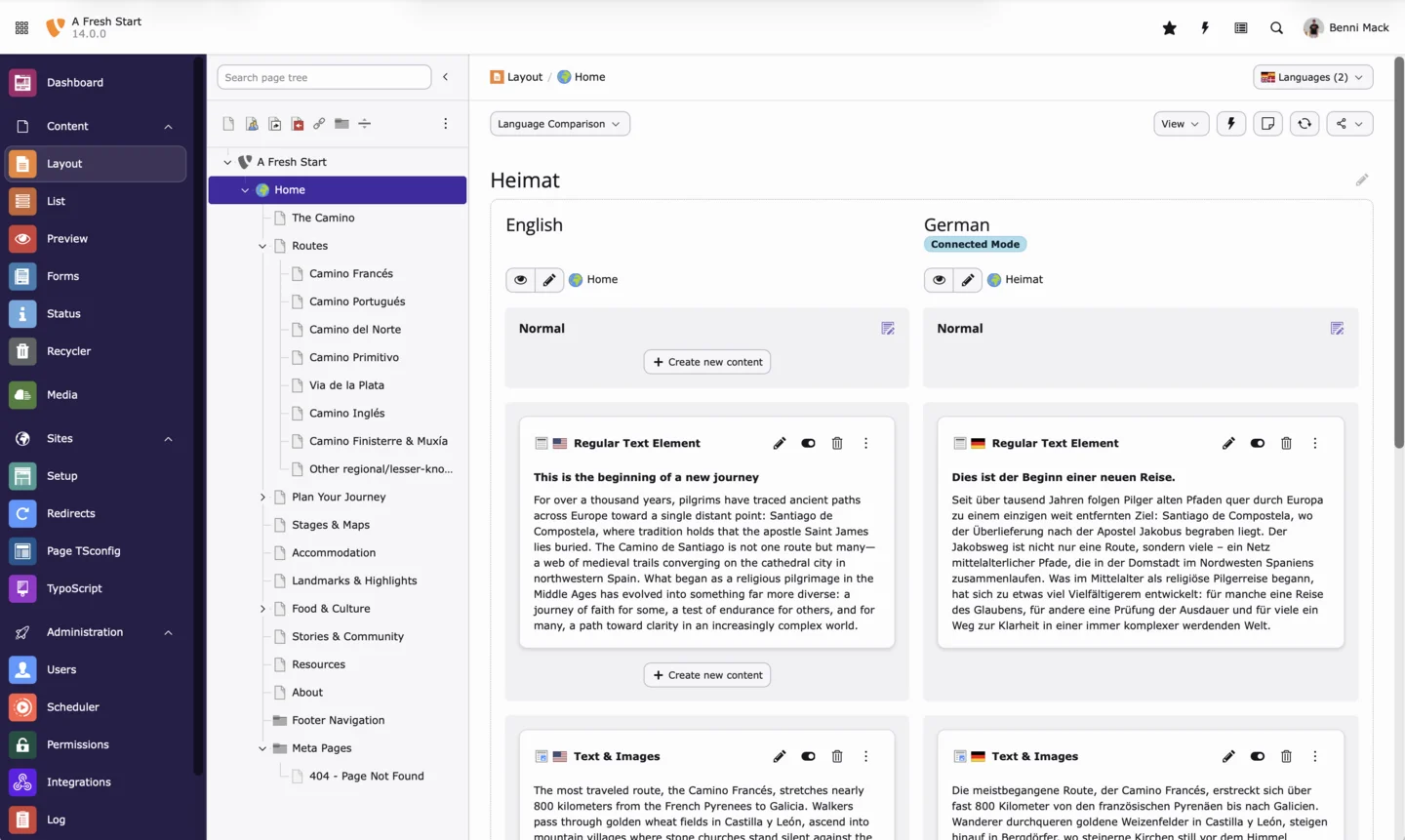
TYPO3 v14 Page Module in the light color scheme (TYPO3 GmbH, CC BY 4.0)
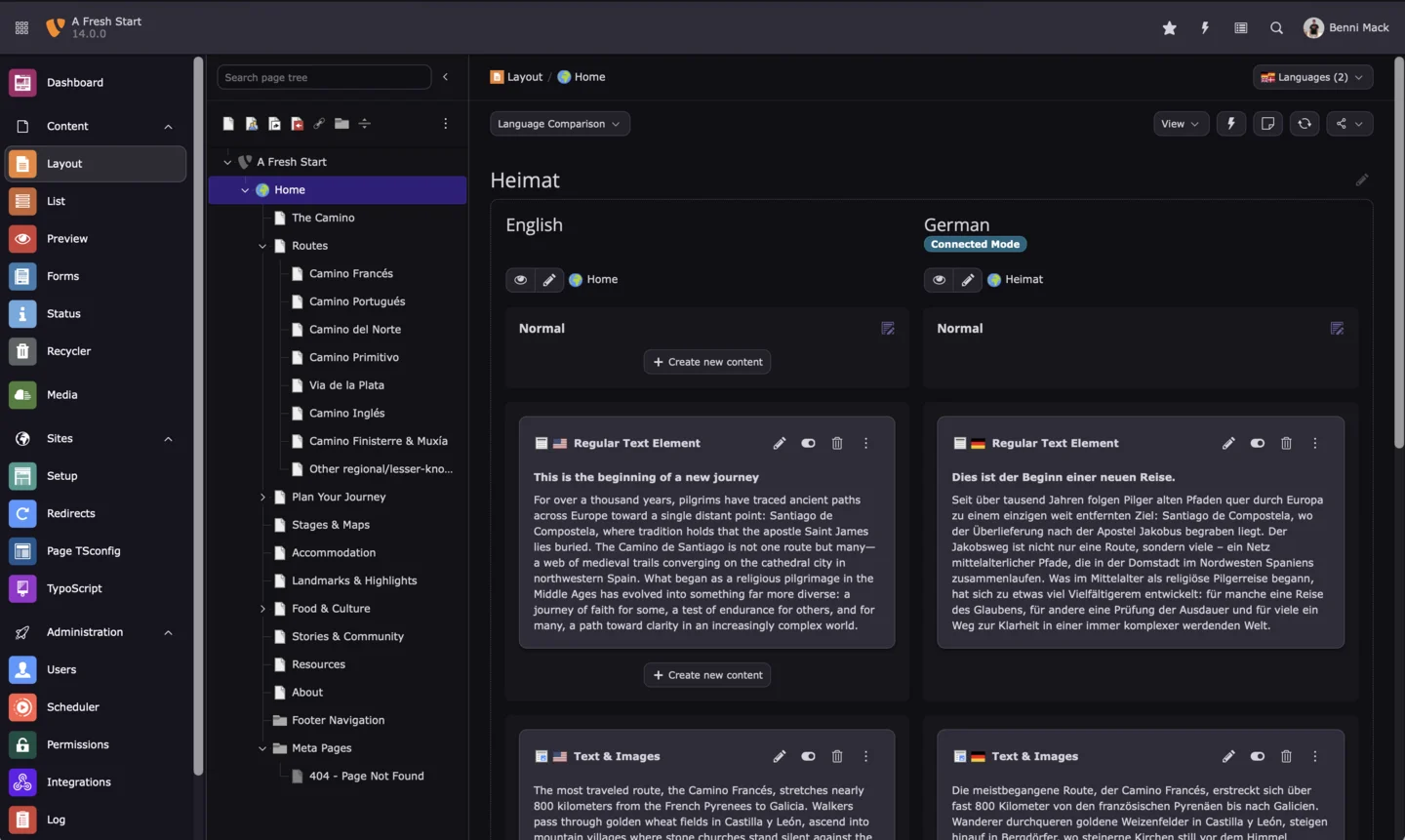
TYPO3 v14 Page Module in the dark color scheme (TYPO3 GmbH, CC BY 4.0)
Edit Content Directly in Context
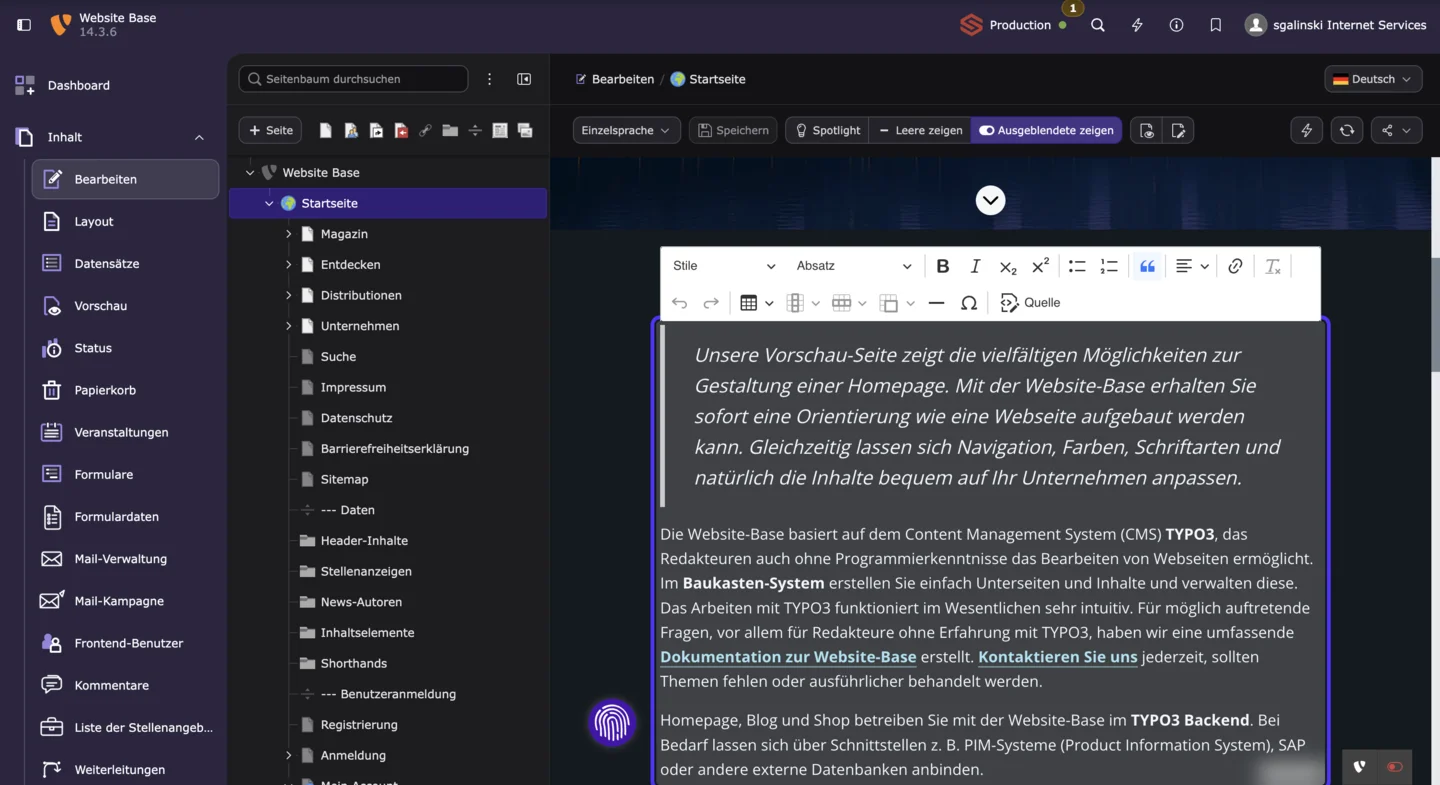
One of the most important new features is contextual editing in the page module. Page properties and content elements open in a side panel while the current page view remains visible in the background. Editors no longer lose the relationship between the page structure and the element they are editing.
Instead of switching back and forth between the page module, a full editing form, and the previous view, the working context remains intact. This reduces clicks and makes extensive pages with many content elements easier to maintain.
We have built on this new foundation in our TYPO3 Website Base and further optimized inline editing and the backend presentation of its content elements. Content can be recognized and edited where it is positioned on the page. This makes day-to-day maintenance easier and improves the presentation of custom content elements and extensions in the page module.
The elements that can use contextual editing depend on the project configuration. During an upgrade, we therefore review and optimize not only the TYPO3 Core but also the specific project’s content workflows.
Create New Pages More Easily and Safely
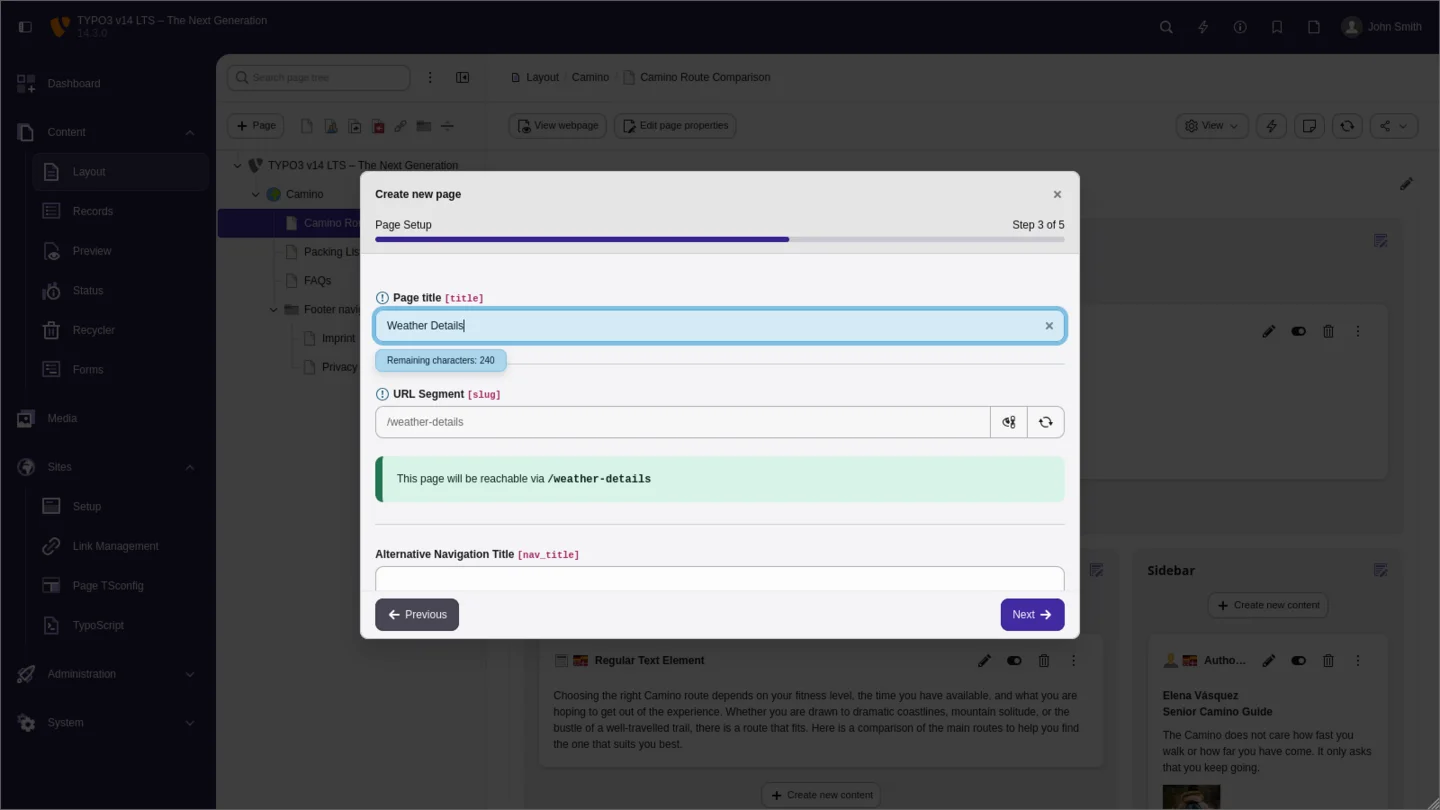
The new page-creation wizard guides users through the entire process step by step: select the position in the page tree, choose a page type, enter the required information, and review the settings before saving. Required fields are validated during the process.
This lowers the barrier for new editors and reduces common mistakes, such as incomplete pages or accidentally selecting the wrong page type. After creating a page, users can go directly to the page module or add another page. The process remains easy to follow even in large page structures.
Scheduled system tasks are also easier to create. A new wizard organizes available scheduler tasks by extension and category and supports search and filtering. Administrators can find the appropriate task more quickly and understand its purpose from its title, description, and icon.
Use Bookmarks and the Dashboard More Efficiently
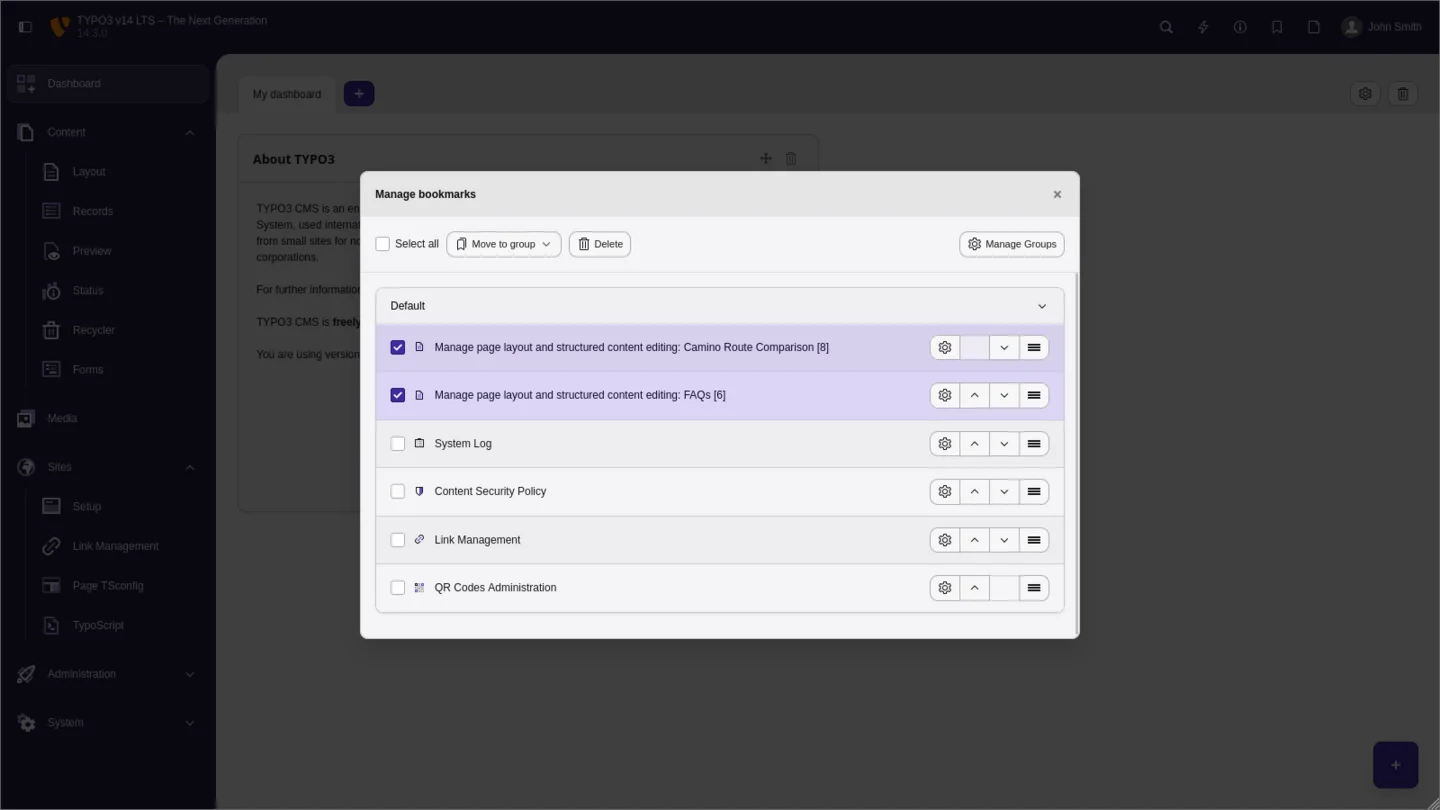
Frequently used pages, records, files, and backend modules can be managed centrally as bookmarks in TYPO3 v14. Personal groups provide structure, while administrators can make global bookmarks available to the entire team.
Bookmarks can be sorted by drag and drop, moved as groups, and deleted together. This creates direct entry points for recurring tasks — for example, frequently maintained landing pages, press sections, forms, or central records. Teams with clearly distributed content responsibilities especially benefit from shorter routes through the backend.
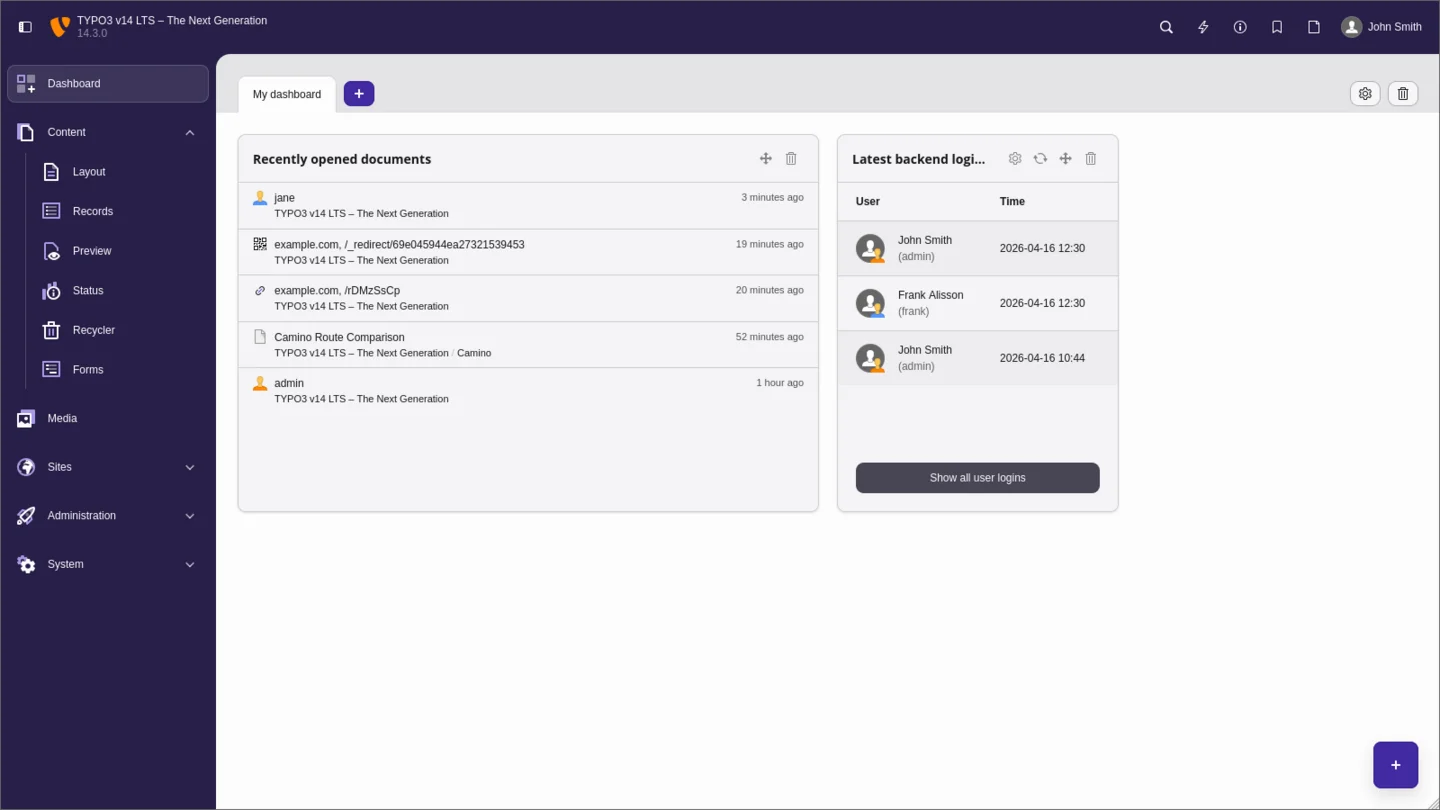
Two new dashboard widgets complement these direct links: Recent Documents provides quick access to recently edited pages and records. An overview of recent backend logins helps administrators monitor activity in the system. Both widgets can be adapted to the individual workflow.
Translations with a Guided Workflow
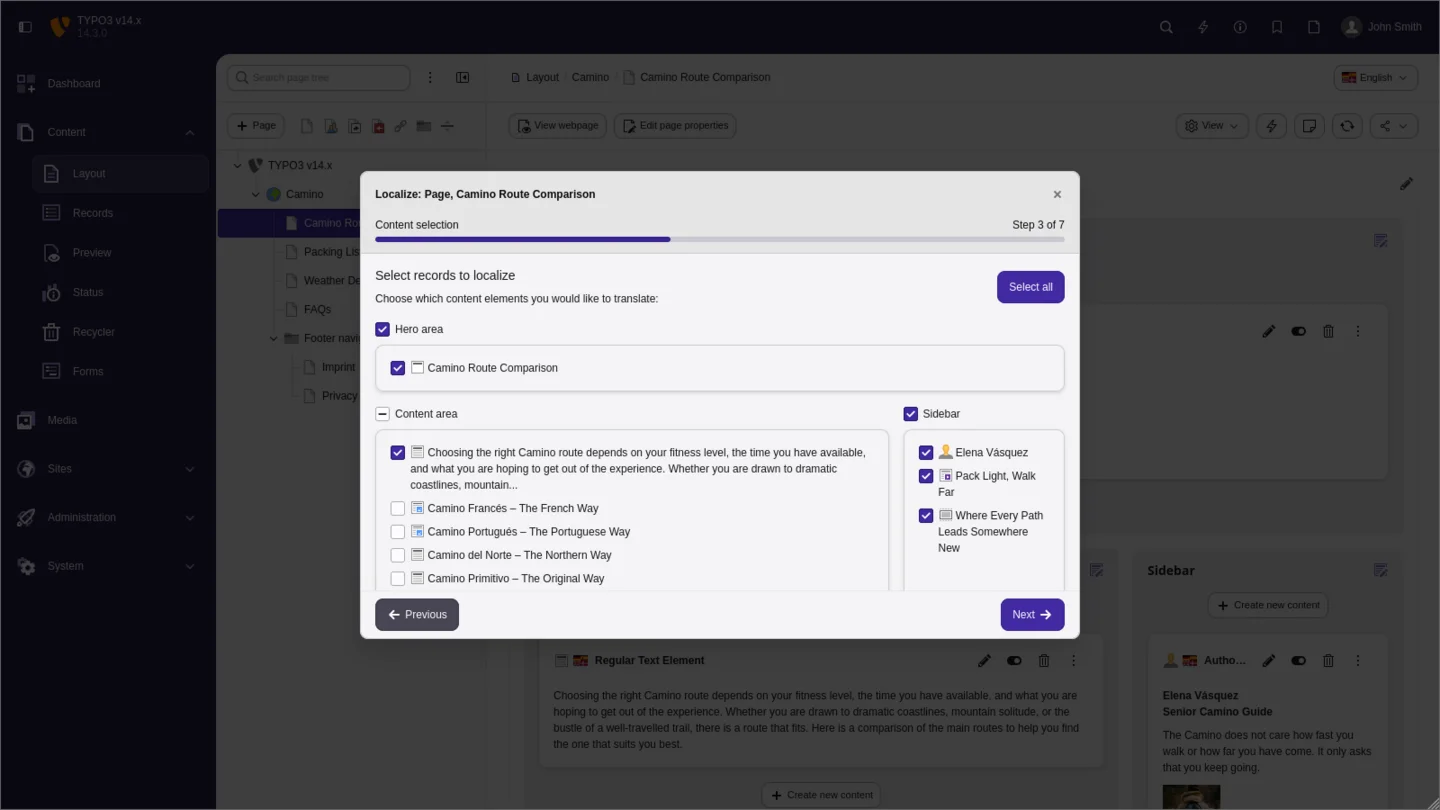
Multilingual websites have been one of TYPO3’s strengths for many years. Version 14 now makes the editorial translation process significantly more efficient. A consistent language selector shows the active language in the relevant modules and allows missing page translations to be created directly.
A guided process and side-by-side presentation of source and target languages make it easier to see which content has already been translated and where work remains. Editors switch between views less frequently and can work on content in a direct comparison.
For international websites serving multiple markets, this means less coordination, more consistent workflows, and fewer localization errors. TYPO3 v14 also makes the technical integration of external translation services easier.
Manage Short URLs, Redirects, and QR Codes Centrally
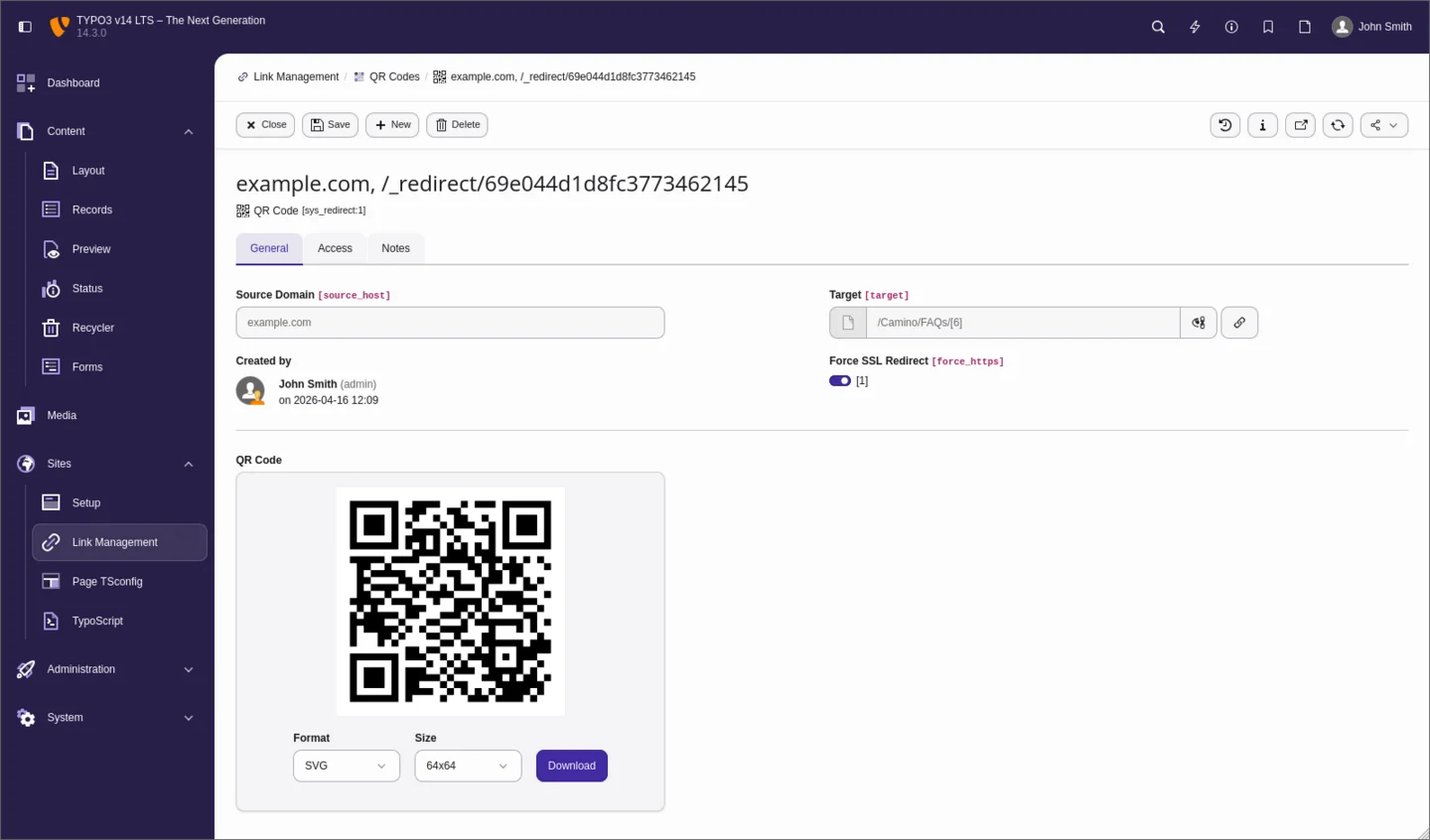
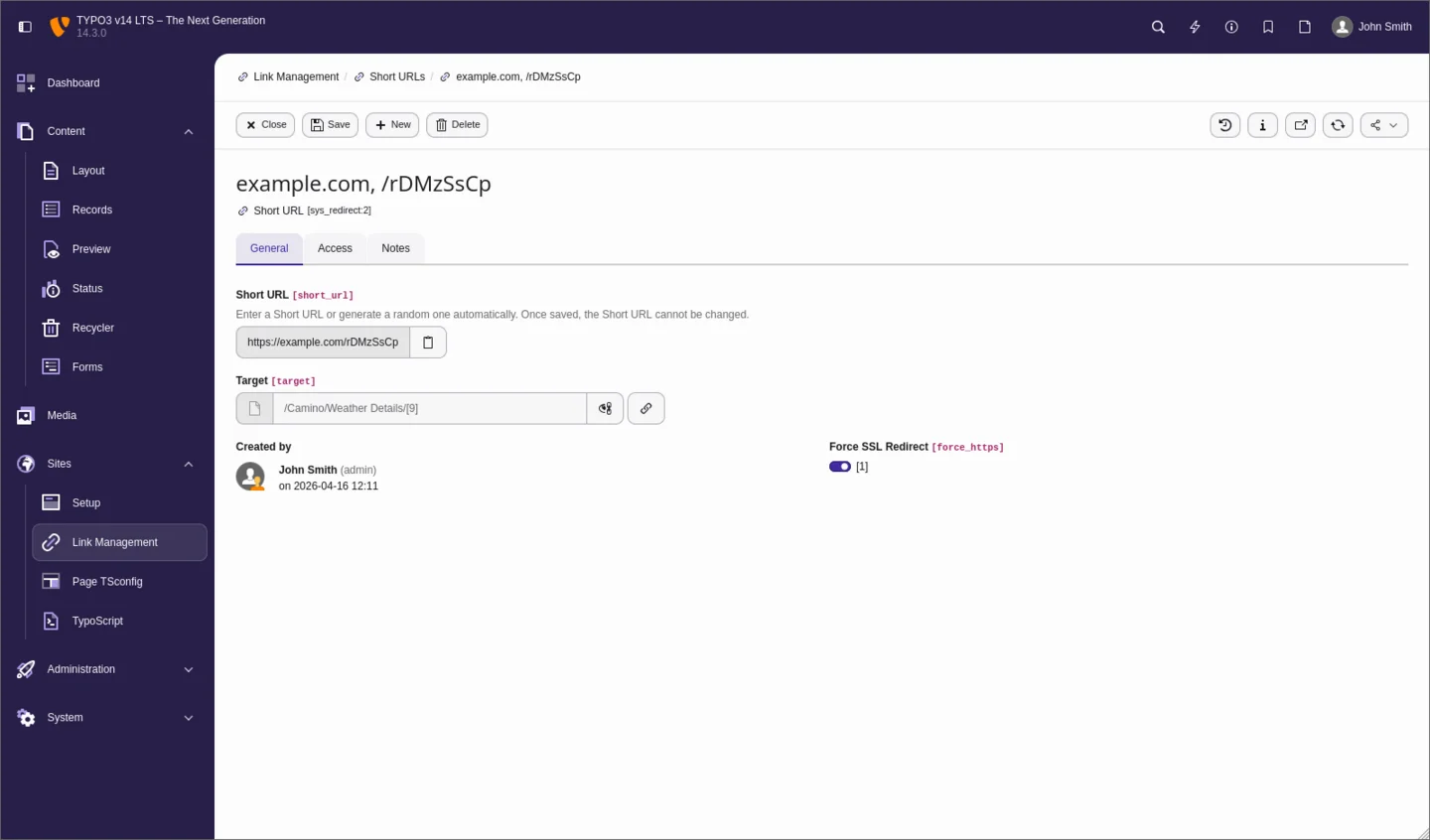
TYPO3 v14 combines redirects, short URLs, and QR codes in central link management. Marketing and content teams can create short, easily shareable URLs for pages, files, and external destinations. QR codes can then be generated directly in the backend in different sizes and file formats.
This is particularly useful for print materials, events, product packaging, presentations, social-media campaigns, and email marketing. External short-link and QR-code generators are no longer required for many everyday use cases. At the same time, the destination remains traceable within the organization’s own TYPO3 system.
Managing traditional redirects is also clearer. This helps with relaunches, changed page structures, and campaigns because redirects can be reviewed and maintained in one central location.
QR codes use permanent URLs whose destination can be changed later without reprinting materials. Short URLs and QR codes also support access counters, enforced HTTPS, and optional expiration dates. Protection mechanisms prevent duplicate or unintentionally modified short links.
Improvements for Forms and Lead Processes
The TYPO3 Form Framework has also been enhanced. Form templates speed up the creation of recurring forms. File- and image-upload fields can accept several files in one operation, which is useful for applications, support requests, and comprehensive contact forms.
Form definitions can now also be stored in the database and tracked through TYPO3’s record history. Existing file-based forms continue to work during the transition. Before changing the storage model, however, the project’s permission concept should be reviewed because access rights differ between database-based and file-based forms.
Flexible confirmations and configurable form workflows support a consistent brand experience from submission to follow-up. Landing pages and lead processes can therefore be implemented more quickly without leaving the CMS’s central administration.
Email notifications can be adjusted more conveniently in the backend. CKEditor 5 supports formatted text within form definitions, while search and improved navigation make the Form Editor easier to use. An additional cleanup command helps remove upload files that are no longer required in a controlled manner.

Camino: A Faster Start for New Standard Websites
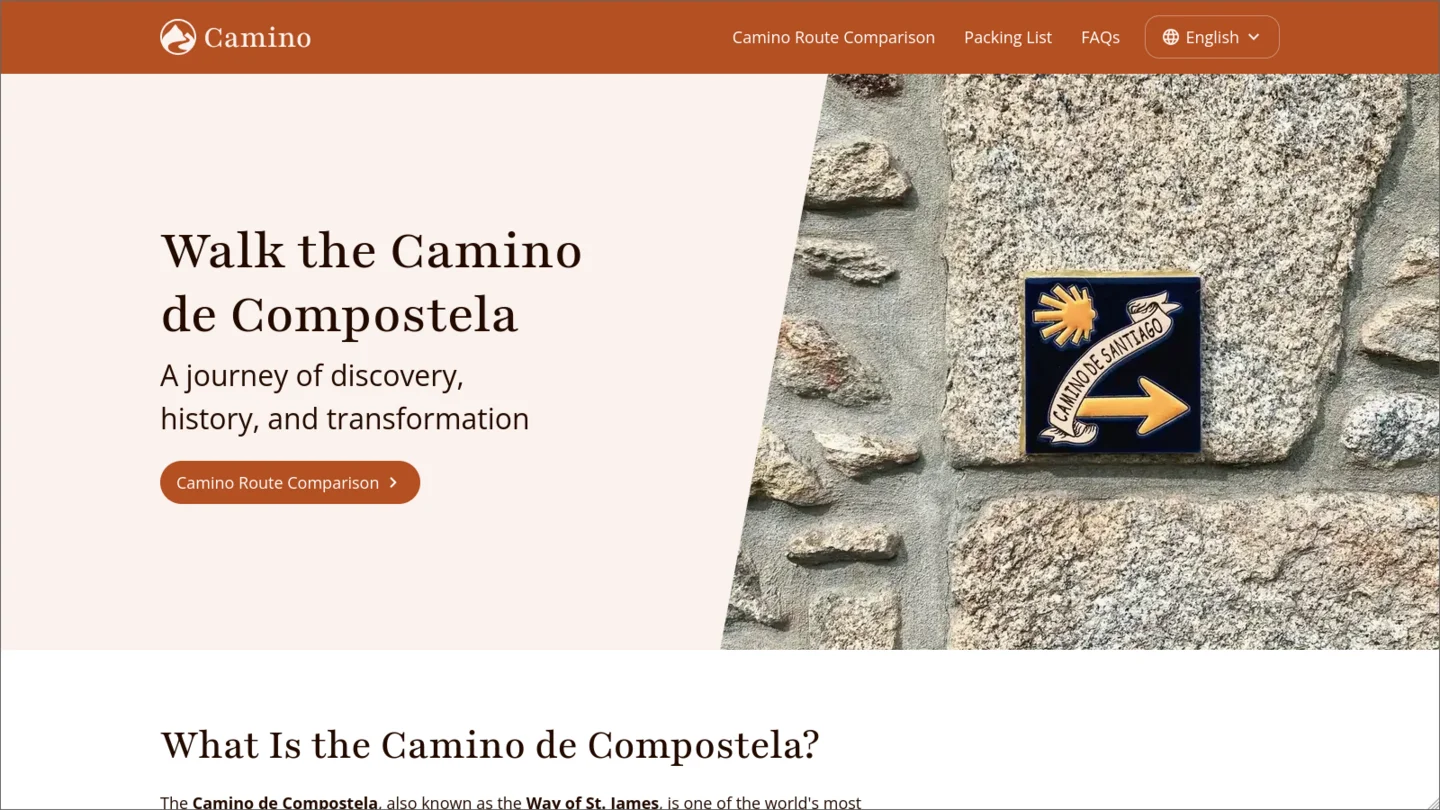
With Camino, TYPO3 v14 includes a modern standard frontend theme for the first time. It provides responsive, accessibility-oriented layout templates and customizable color schemes. Simple websites and prototypes can therefore start with a solid basic design without first developing a complete custom theme.
For smaller websites, campaigns, and early project phases, Camino can reduce time to market. For individual corporate websites, portals, and complex platforms, however, a project-specific design and integration concept remains essential.
An upgrade of an existing website does not automatically activate Camino or replace its current frontend. Existing sgalinski projects retain their individual design; Camino is primarily an additional option for new, standardized projects.
Visible to Search Engines and AI—and Accessible to Users
TYPO3 v14 strengthens the technical foundation for discoverable and usable content. Stable URLs, metadata, and sitemaps can be represented consistently in the site configuration. Fully equipped link pages help manage internal destinations transparently and make relevant information available in a structured form.
A clear semantic structure supports more than traditional search-engine optimization. It also improves the conditions under which generative search systems can understand content and consider it in relevant contexts. This does not guarantee rankings or mentions by AI systems—high-quality, authoritative, and up-to-date content remains essential.
Improved combobox components and responsive image crops support more accessible operation and consistent presentation across devices. For public institutions and demanding brands, TYPO3 v14 provides a robust foundation that must be complemented in each project by editorial quality, accessible templates, and regular testing.
We review your current installation, extensions, custom functionality, and system environment. You receive a clear assessment of the effort, risks, extension compatibility, and a suitable timeline.
Especially Relevant for Developers and Integrators
In addition to the visible backend improvements, TYPO3 v14 modernizes its technical foundation. This benefits maintainability, extensibility, and the long-term stability of custom projects.
TYPO3 v14 supports PHP 8.2, 8.3, 8.4, and 8.5. Supported databases include MySQL 8.0.17 and later, MariaDB 10.4.3 and later, PostgreSQL 10 and later, and SQLite 3.8.3 and later. Before an upgrade, both the minimum requirements and the support periods of the specific PHP and database versions in use must be considered.
Broad support for current PHP versions makes it easier to modernize the hosting environment and establishes a reliable foundation for the coming years. Server configuration, deployment, search systems, external services, and all project-specific dependencies should also form part of the upgrade assessment.
Install Tool sessions can be stored centrally in Redis in modern hosting and cluster environments. Improved CLI tools also make automated installations and deployments easier without forcing existing installations to change their infrastructure immediately.
TYPO3 v14 uses Fluid 5. The new generation of the template engine improves template processing and maintainability. Flexible file names and extensions make syntax highlighting in development environments easier. A stricter argument processor provides clearer error messages for incorrect data types. Native CDATA support simplifies the inclusion of certain styles and scripts without causing conflicts with curly braces.
For existing projects, moving to Fluid 5 primarily means that custom templates, ViewHelpers, and extensions should be reviewed during the upgrade and adjusted where necessary.
New ViewHelpers simplify the output of metadata, content areas, records, and responsive images. The new fluid CLI command helps identify errors and outdated structures in templates at an early stage.
TYPO3 v14 simplifies the technical handling of translations. Shorter, domain-based identifiers replace many long LLL:EXT:... paths. Language files are detected automatically and cached deterministically. New command-line tools help validate translations and identify missing or incorrect entries.
Support for XLIFF 2 and ICU plural forms provides a better foundation for linguistically correct, internationally scalable applications. This is particularly relevant for extensive multi-site and multilingual projects.
Site Sets can bundle routing and sitemap configurations. Importing and exporting site configurations also makes controlled transfers between development, staging, and production environments easier and supports reusable configurations for multiple websites and markets.
The new #[Authorize] attribute allows access rules for Extbase actions to be defined declaratively. Checks for login status and user groups can be attached directly to the relevant actions. Custom authorization classes support dependency injection and can be tested in isolation.
This improves the readability and testability of security-related logic. Unauthorized access can be answered consistently with an HTTP 403 response.
The additional #[RateLimit] attribute can protect sensitive actions such as logins, form submissions, and resource-intensive endpoints against excessive requests.
The revised exception handler can copy complete error information and stack traces to the clipboard with one click. The output is already formatted as structured Markdown and can be transferred to tickets, documentation, or development tools without assembling the information manually.
This may sound like a small improvement, but it saves time in support and error analysis and reduces the risk of omitting important technical information.
A new System Resources API provides a more consistent foundation for accessing extension files, FAL assets, project files, and external resources. Usage reports show how frequently content-element types and fields are actually used. In mature projects, developers and integrators can identify unnecessary configurations more easily and clean up the data structure systematically.
What Additional Improvements Come from TYPO3 v13, v12, and Older Versions?
TYPO3 v14 builds on the improvements introduced in previous major versions. Projects moving from TYPO3 v13 primarily gain the new functions and technical changes in v14. An upgrade from v12, v11, or an even older version also includes all relevant improvements from the intermediate releases. The actual gain therefore depends on the source version and the project’s individual configuration. The following sections summarize the most important additional improvements included when moving to v14.
TYPO3 v13 established important foundations for the backend that has now been developed further in v14. When upgrading from TYPO3 v12 or older to v14, the following improvements are therefore also included:
- A modernized page and file tree with better performance, additional status information, and direct movement of content between pages.
- Dark mode and improved support for different backend color schemes.
- New keyboard shortcuts for saving, closing, and backend search, plus a hotkey API for project-specific shortcuts.
- More comprehensive backend search across pages, content, records, modules, and workspaces.
- Bulk editing of pages, files, records, and content.
- Reusable presets for recurring data exports.
- Improved support for right-to-left languages and international projects.
- Site Sets for reusable TypoScript, TSconfig, and site configurations.
- Modernized APIs, image processing, caching, and development tools.
TYPO3 v14 continues this development consistently with its new navigation, contextual editing, guided page creation, improved translations, and Fluid 5.
An upgrade from TYPO3 v11 or older to v14 also includes the key improvements introduced in TYPO3 v12. These include:
- CKEditor 5 and a modernized page module for clearer content editing.
- An optimized file list with tile view and improved drag-and-drop workflows.
- More flexible backend search and additional options through user TSconfig.
- Multi-factor authentication, rate limiting, Content Security Policies, and modern HTTP security headers.
- Extended password policies and improved protection for sensitive access points.
- Webhooks, Reactions, and asynchronous processing for integrations and automated workflows.
- Modernized TCA field types, Extbase improvements, and a more current database abstraction layer.
- Optimized caching mechanisms and support for modern PHP versions.
- More flexible language fallbacks, country information, and improvements for international websites.
- Automatic redirects, an improved Link Validator, extensible dashboards, and HTML email templates.
Together with the new features in v13 and v14, these functions provide a significantly more modern foundation than older TYPO3 installations.
For TYPO3 v11, v10, and older versions, the gap to v14 is correspondingly larger. In addition to visible features, technical dependencies, PHP and database requirements, APIs, extension interfaces, and sometimes data structures have changed.
These installations can also be migrated to TYPO3 v14. The necessary major-version steps are completed in a controlled manner within one coordinated upgrade project. Before implementation, we review in particular:
- Core and third-party extensions.
- Custom extensions, templates, and ViewHelpers.
- Integrations, search systems, and external services.
- User permissions, workspaces, and multilingual content.
- Hosting, PHP, database, and deployment.
- Outdated or no longer required functionality and data structures.
The older and more customized the installation, the more important a comprehensive assessment, migration plan, and complete quality assurance become. However, an upgrade does not automatically require a new design or a complete relaunch.
Why Companies Keep Their TYPO3 Systems Up to Date
A major upgrade is more than a technical obligation. An up-to-date TYPO3 system reduces long-term operational risks, improves workflows, and preserves the digital platform’s extensibility.
How Does an Upgrade to TYPO3 v14 Work?
A TYPO3 upgrade is not performed directly on the production website. First, a complete working copy is created in a development or staging environment. The Core, extensions, custom code, templates, data, and integrations are updated and tested there in a controlled manner. The new version is published only after technical and editorial approval.
①
Inventory
Record the TYPO3 version, hosting, PHP, database, extensions, custom development, and external integrations.
②
Compatibility Review
Check the availability of v14 versions for all extensions and identify required adjustments or alternatives.
③
System Update
Modernize the Core, dependencies, configuration, templates, and custom code step by step.
④
Data Migration
Update the database schema and run the required upgrade wizards in a controlled manner.
⑤
Quality Assurance
Test the frontend, backend, forms, search, multilingual content, permissions, integrations, and editorial workflows.
⑥
Deployment and Monitoring
Roll out the upgrade as planned, rebuild caches and indexes, and monitor the system after launch.
Who Should Upgrade Now?
TYPO3 v14 is relevant both for new projects and as the target version for existing installations. The urgency and required steps depend on the TYPO3 version currently in use, its extensions, and the website’s degree of customization.
TYPO3 v11 and Older Versions
Installations running TYPO3 v11, v10, or older versions are outside regular free support. Depending on the version, ELTS may still be available, but it is not a permanent substitute for moving to a current technical foundation.
The migration is planned as a controlled version upgrade. We review the Core, PHP and database requirements, third-party extensions, custom development, templates, integrations, and data migrations. Required major-version steps are implemented and tested within one coordinated upgrade project. A relaunch is not automatically required.
Websites Running TYPO3 v12
TYPO3 v12 projects require concrete action because free support ended on April 30, 2026. In many cases, moving to v14 is more sensible than an intermediate project on v13 because it provides a longer support period and avoids another major upgrade in quick succession.
Whether this route is possible and cost-effective depends on the extensions and customizations in use. If an upgrade cannot be completed in the short term, ELTS provides temporary protection—but it does not replace a long-term modernization strategy.
Websites Running TYPO3 v13
TYPO3 v13 continues to receive free security updates through the end of 2027 and can remain a stable foundation for existing projects. An immediate upgrade is therefore not necessary in every case.
Moving to v14 is particularly worthwhile when contextual editing provides a clear benefit to content teams, new features or a relaunch are already planned, the hosting and PHP environment is being modernized, or the longest possible support period is desired. Several technical measures can then be combined into one coordinated release.
New TYPO3 Projects
TYPO3 v14 LTS is the recommended starting point for new projects. New features and integrations can be built directly on the current architecture without planning another major-version change shortly afterward.
Current PHP and database versions, Fluid 5, modern development tools, and v14-compatible extensions can be incorporated cleanly from the outset.
This reduces later migration work and creates a maintainable long-term foundation with free security updates through June 2029.
We support TYPO3 upgrades from the initial assessment through stable operation of the new version. We review not only the Core but the complete installation, including extensions, custom content elements, templates, integrations, search systems, hosting, and editorial workflows.
You receive a transparent assessment of the effort, risks, and required changes. The upgrade is implemented in a separate environment, reviewed technically and editorially, and then deployed in a controlled manner. Existing design and content are retained unless a relaunch or content revision is deliberately planned at the same time. Contact us for a no-obligation proposal.
Operation, Maintenance, and Hosting After the Upgrade
An up-to-date TYPO3 Core delivers its full value only in an equally reliable system environment. If required, we provide managed hosting, regular security and maintenance updates, monitoring, backups, and technical support after the upgrade. PHP, database, and server versions are planned together with TYPO3. This keeps support periods, performance, and future upgrade readiness transparent and manageable over the long term.
Optimally Configured for TYPO3
Unlimited Traffic
High Performance
At Least 99.7%
(Overall Availability)
99.9% Network Availability
At Least 99.7% Overall Availability
DDoS Protection and Integrated Firewall
We ensure that your TYPO3 instance and installed extensions receive security updates promptly within the current major version. We plan larger updates that require migration effort together with you and perform comprehensive quality-assurance tests to ensure a smooth implementation.
Our managed hosting service offers numerous benefits, including the TYPO3/website security-update service for a secure, up-to-date website. You benefit from a fair-use model for CPU, RAM, and storage, while mail and domain hosting remain your responsibility. We provide file-based backups, free SSL certificates, and optional SSH/SFTP access. A 1 Gbit connection ensures fast and stable connectivity.
Our flexible contract terms give you full control: no minimum term, cancellation with 30 days’ notice to the end of the month, and annual billing provide maximum transparency.
Ready for TYPO3 v14: Website Base and sgalinski Extensions
AI-Assisted Content Workflows with SG AI
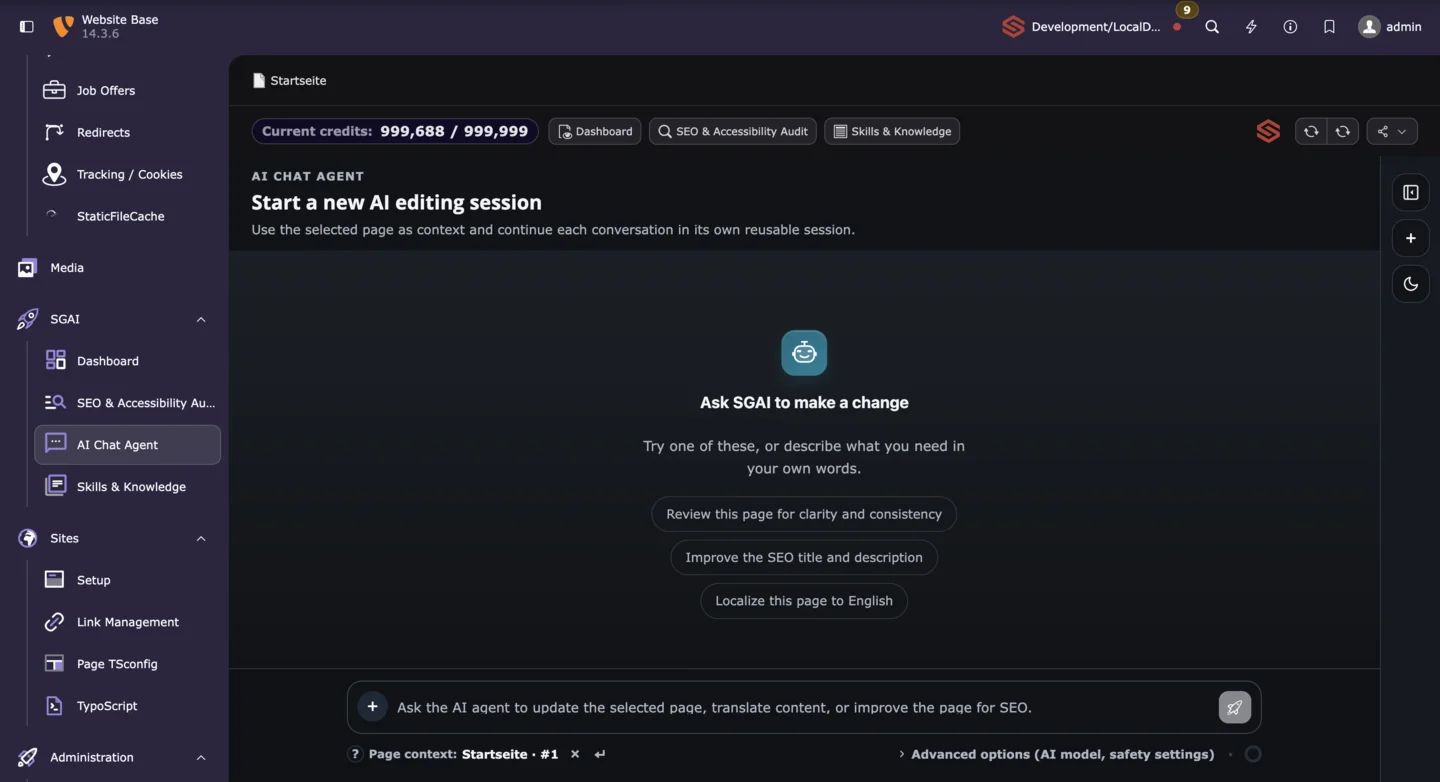
SG AI brings AI-assisted features directly into TYPO3 content workflows. These include creating and optimizing text, images, alternative text, and SEO metadata, as well as recommendations for technical SEO, content quality, and accessibility. For TYPO3 v14, the integration has been adapted to the modernized backend. The new Chat Agent complements these tools with conversational, context-aware assistance that can read and edit approved page and content fields through controlled MCP workflows.
Modern APIs and MCP with SG API Core
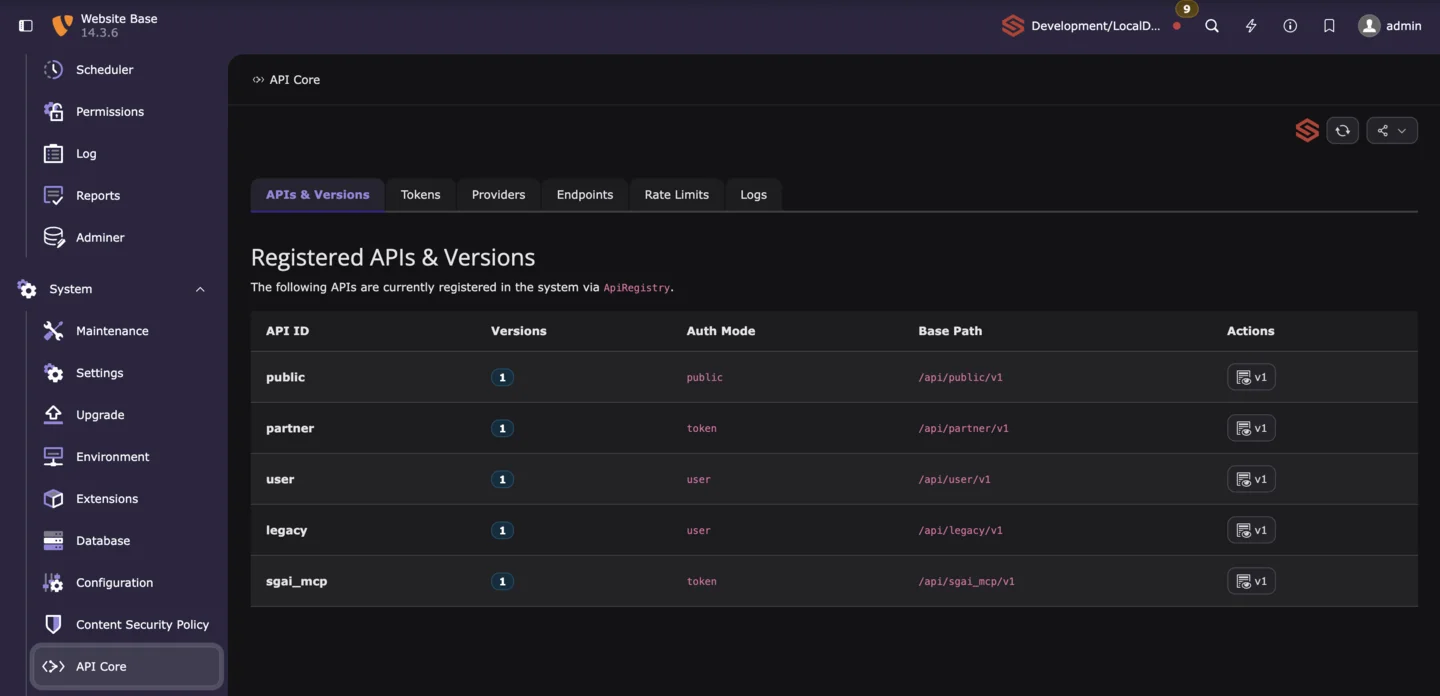
SG API Core provides the technical foundation for custom REST APIs and structured integrations with external systems. APIs, versions, access rights, authentication, rate limits, caching, and technical logs can be managed centrally. OpenAPI 3 documentation and Swagger UI make development, coordination, and testing easier.
Integrated support for the Model Context Protocol extends this foundation with controlled tools for AI assistants and automation processes. The TYPO3 functions available to them are clearly limited and transparently managed through API configuration, authentication, and permissions.
GDPR-Compliant Consent Management with SG Cookie Opt-In
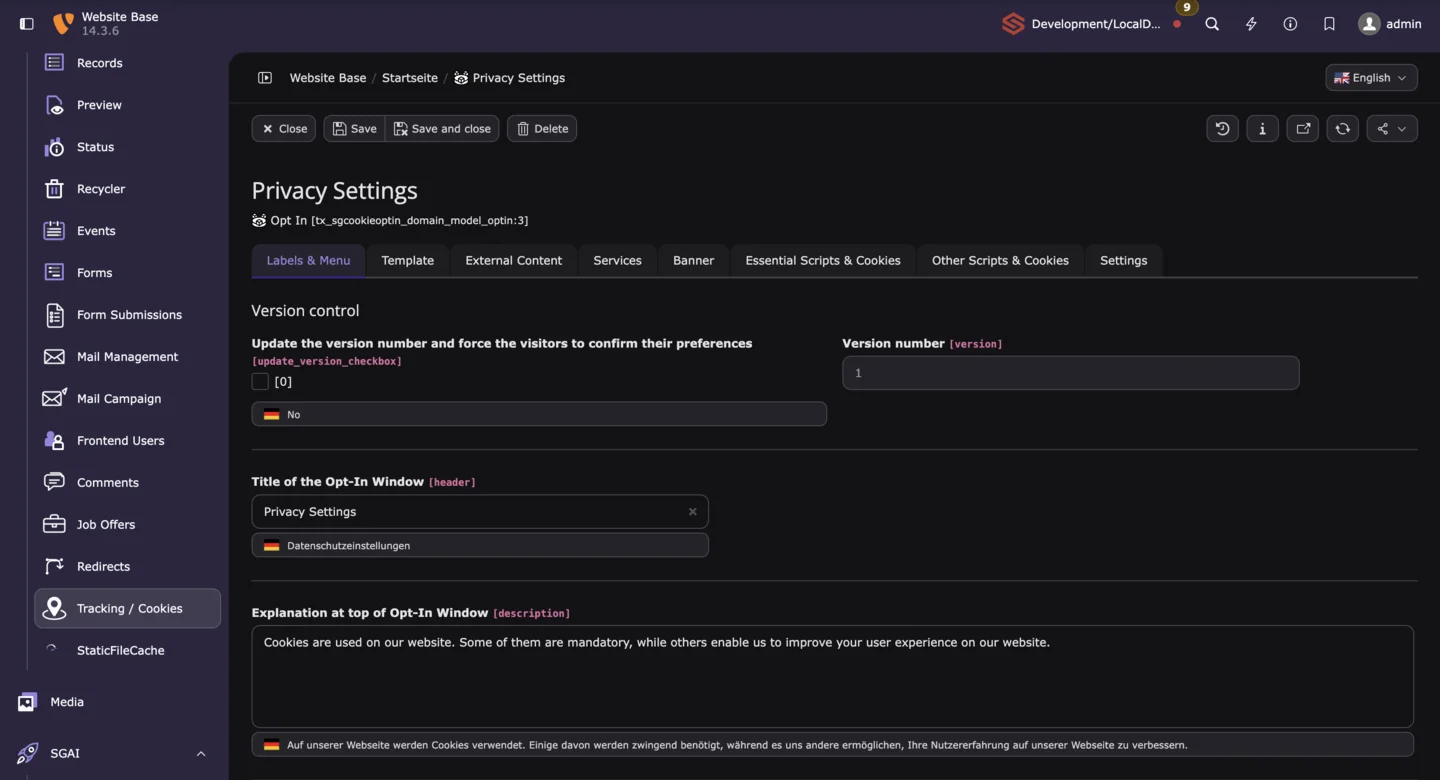
SG Cookie Opt-In has been prepared for TYPO3 v14 and adapted to the modernized backend environment. Consent content, services, cookie groups, and consent records can be managed centrally in TYPO3. Improved backend previews and editorial workflows make maintenance easier, even in complex website projects.
Forms, PDF Finisher, and ALTCHA
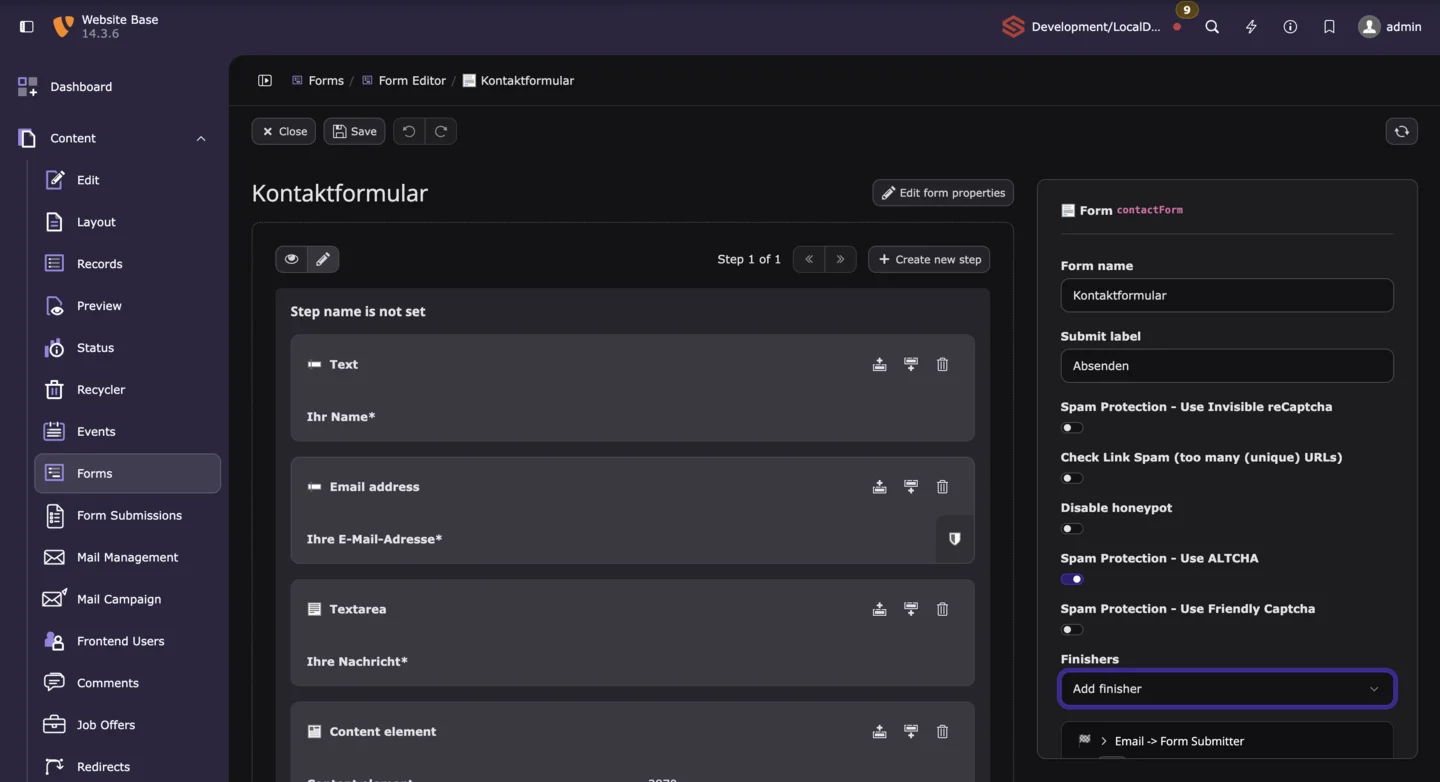
SG Forms has been comprehensively adapted to TYPO3 v14 and its new backend structure. The extension enhances the TYPO3 Form Framework with features including repeatable fields, clear management of stored submissions, CSV exports, and additional upload and cleanup workflows. Its integrated PDF Finisher transfers submitted data into existing PDF forms, can attach completed documents to emails, provide one-time time-limited downloads, and optionally flatten the finished PDF to prevent subsequent editing. ALTCHA Proof of Work and other combinable protection mechanisms help reduce automated form abuse in a privacy-conscious way.
Additional sgalinski Extensions Compatible with TYPO3 v14
Other actively maintained sgalinski extensions are also prepared for TYPO3 v14. SG Campaigns and SG Mail support newsletter campaigns and the central processing of outgoing email. SG Account and SG Jobs provide protected user areas, career portals, and structured application processes.
Additional v14-compatible extensions are available for news, comments, video, SEO, redirects, teasers, language control, and performance. Before each upgrade, we review and document only the components actually used in the customer’s installation.
Conclusion: TYPO3 v14 Primarily Improves Everyday Work
TYPO3 v14 LTS combines a modernized technical foundation with numerous improvements that are immediately noticeable in day-to-day CMS use. The clearer backend, contextual editing, guided page creation, more efficient translations, and central link management reduce unnecessary intermediate steps for content and marketing teams.
At the same time, Fluid 5, current PHP versions, and new development tools provide a future-ready foundation for custom websites and complex platforms. Free security support through June 2029 gives companies long-term planning security.
Installations running TYPO3 v11 or older should have an individual migration plan. TYPO3 v12 projects also require concrete action following the end of free support. Projects on TYPO3 v13 can plan the move strategically based on editorial benefits, technical measures, and the desired lifecycle. New projects should start directly with TYPO3 v14.
As a TYPO3 agency, we support the entire process: from analyzing the existing installation and adapting custom extensions to quality assurance and controlled deployment.
Frequently Asked Questions About TYPO3 v14
TYPO3 v14.3 LTS was released on April 21, 2026. It is the current Long-Term Support version recommended for new projects.
Free bug fixes are scheduled through December 2027. TYPO3 v14 receives free security updates through June 30, 2029. Support can subsequently be extended through the paid ELTS program.
No. TYPO3 v13 continues to receive free security updates through the end of December 2027. An upgrade can still be worthwhile when new editing features are needed, technical dependencies are being modernized, or planned improvements can be combined into one release.
Since May 1, 2026, TYPO3 v12 no longer receives free maintenance or security updates. The website continues to run, but without ELTS, newly discovered vulnerabilities are no longer resolved through free Core updates. An upgrade or temporary ELTS protection should therefore be planned.
No. The modernized backend and optional Camino theme do not automatically change the existing frontend. The current website design remains in place unless a relaunch or design update is deliberately included in the project.
No. Every Core and third-party extension, as well as all custom development, must be reviewed. For sgalinski projects, we analyze the specific combination in use and update or replace incompatible components as part of the upgrade.
In principle, older TYPO3 installations can also be migrated to v14. The required major-version steps are completed in a controlled manner within one coordinated upgrade project. The scope and approach depend on the source version, extensions, custom code, templates, data structure, integrations, and system environment. We therefore prepare an individual migration plan before implementation.
The duration depends on the size and degree of customization of the website. A standardized installation with current extensions requires significantly less effort than a platform that has evolved over many years with custom integrations and specialized functionality. A reliable estimate is possible only after a technical assessment.


Comments and ratings